The Brain Board with Wozanium Pack
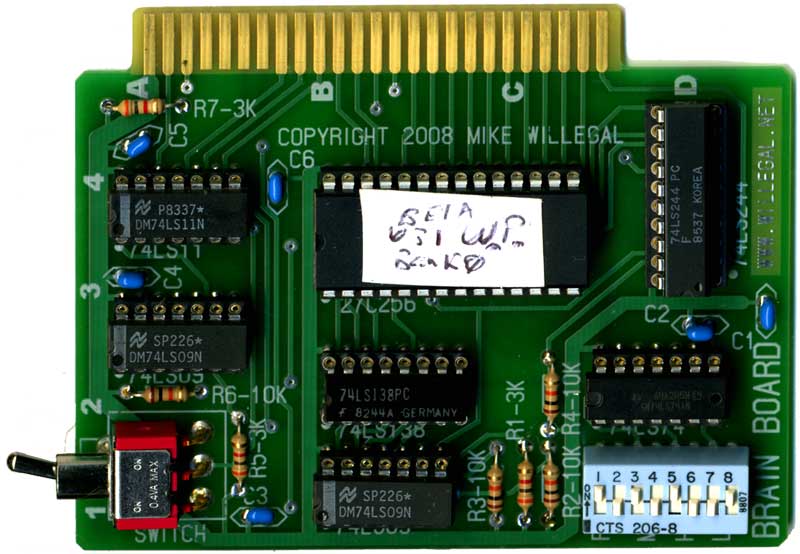
The Brain Board
See my firmware board page for
information on a prototype version of this board.
The brain board is a firmware board for your Apple II/Apple II plus
or Apple IIe computer. The board uses inexpensive and readily
available 27c128 or 27c256 PROMs. Because of the denser PROMs used,
6 sockets are replaced with one and the resulting size of the board
is reduced to under 3 by 4 inches. The original Apple firmware board
was able to replace motherboard ROM functionality with it’s own
ROM’s. This allowed an Apple II to have Applesoft in ROM or an Apple
II plus to have Integer basic in ROM. A softswitch (flip-flop) is
included which allows for switching between the firmware card and
motherboard ROMs through software control. The board also includes a
little known and seldom used capability that allows multiple
firmware cards to coexist in the same system as long as they are in
adjacent slots. Firmware cards were normally located in slot 0, but
they could be located in any slot.
Later on in time, a 16K ram (language) card was developed that had
the same functionality, except the appropriate BASIC was loaded into
the language card from disk when DOS was booted. The multiple card
support was dropped.
The base design of the Brain Board includes all the capability of
the Applesoft/Integer Basic Firmware ROM board that Apple Computer
released around 1978 including:
- a switch for enable/disable
- a software controlled switch (soft switch) for changing
between motherboard ROMs
- firmware board ROMs jumper for enabling monitor ROM F8 - this
was a solder pad jumper in the Apple design
- daisy chain enable functionality via DMA bus connections for
multiple card support
In addition, I have added several enhancements in order to maximize
usefulness of the board.
- The modified design will allow booting a ROM-less motherboard
into DOS, which is not possible with the original firmware board
27C256 PROMs allow support of two complete ROM images on the
Brain Board. Images of both Applesoft and Integer BASIC with
matching monitors could be installed and used from the single
PROM.
- An extra soft switch is used to select whether the high or low
half of the PROM is in use. This soft switch can be configured
by external switch, through software control or by jumper.
- The Apple II peripheral bus I/O select signal is connected to
the lowest 256 bytes of the PROM bank that is currently selected
by the bank select flip flop. I/O select is connected to a
different address depending upon the slot the board is located
in. Slot 0 does not have a I/O select signal, so this feature
cannot be used if the Brain Board is installed in slot 0. The
starting address for these 256 bytes is computed by multiplying
0x100 by the slot number and adding 0xC000. Thus slot 1 is
0xC100, slot 2 is 0xC200, etc.
Wozanium Pack
The low bank of the PROM provided with the Brain Board optionally
includes a special program that will transform your Apple II into a
operating facsimile of an original Apple 1 with 16K of expanded
memory. This expanded memory was an authentic modification made to a
number of original Apple 1s. If the Brain Board is installed in slot
1, you will also obtain access to an authentic Apple Cassette
Interface (ACI) driver located at address C100, just like the
original Apple 1. Input and output to your transformed Apple is now
limited to the keyboard, video and cassette interfaces, also just
like an original Apple 1. Software in PROM is limited to a ported
version of the orignal Apple 1 monitor and the latest known version
of Apple 1 BASIC (the so called Huston Basic) which is located at
the same address in memory (E000) as it would be located at, in an
actual Apple 1.
Your transformed Apple will be able to run most original Apple 1
assembly and BASIC programs. Programs must either be keyed in
through the monitor or loaded via the ACI (Apple Cassette
Interface). No other options are standard, though you could add
drivers for serial ports or other expansion cards, if you wished to.
More details are provided in the manual.
Example Wozanium Pack - User
Driver
The Wozanium Pack provides a capability for user device
drivers for input and output. Applications that directly
access the Apple 1 PIA for keyboard input may or may not access the
hooks that are used to enable these drivers depending upon how they
are implemented. Here is a simple example driver for the
Super Serial Board (slot 2 only). This driver should be loaded
into locations 6000. 605B using the cassette interface. Once
loaded type 6000R to initialize the driver. Here is an AIF encoded version of this
driver ready for loading onto your digital music player.
PROCESSOR 6502
LIST ON
ACIASTAT EQU $C0A9
ACIADATA EQU $C0A8
ACIACMD EQU $C0AA
ACIACTRL EQU $C0AB
READVECTOR EQU $BC02
WRITEVECTOR EQU $BC04
RETTOMON EQU $FF1F
ORG $6000
INIT
LDA #$2B
;ODD PARITY, NO ECHO, RTS LOW/W NO INT, IRQ DISABLED, DTR LOW
STA
ACIACMD ;
LDA #$3E
;1 STOP BIT, 7 DATA BITS, 9600 BAUD
STA
ACIACTRL ;
;SAVE OLD VECTORS
LDA READVECTOR
STA READRET
LDA READVECTOR+1
STA READRET+1
LDA WRITEVECTOR
STA WRITERET
LDA WRITEVECTOR+1
STA WRITERET+1
;OVERWRITE VECTORS WITH NEW FUNCTIONS
LDA #<READ
STA READVECTOR
LDA #>READ
STA READVECTOR+1
LDA #<WRITE
STA WRITEVECTOR
LDA #>WRITE
STA WRITEVECTOR+1
JMP RETTOMON
WRITE:
PHA
;SAVE BYTE TO WRITE
WRITE2:
LDA
ACIASTAT ;READ STATUS REGISTER
AND #$10
;TRANSMIT REGISTER EMPTY?
BEQ
WRITE2 ;WAIT FOR EMPTRY
PLA
;CHARACTER TO WRITE
STA ACIADATA ;WRITE IT
; RTS
; RETURN, WITHOUT DISPLAY
JMP (WRITERET) ; RETURN,
AND DISPLAY
READ2
JMP
(READRET) ;ALLOW KEYBOARD INPUT TO OCCUR
READ
LDA ACIASTAT ;READ STATUS
REGISTER
AND #$08
;READ READISTER FULL
BEQ READ2
;NO, WAIT FOR CHAR TO ARRIVE
LDA
ACIADATA ;FETCH CHARACTER
ORA #$80
;SET MS BIT - APPLE 1 ASSUMES THIS
READ3
RTS
;RETURN
WRITERET DC.W 1
READRET DC.W 1
Video Demo of the Wozanium Pack
See the first public demo of the "BRAIN BOARD" on my video
podcast #24
http://www.willegal.net/feed.xml
Follow My Blog Posts Related to the Brain Board/Wozanium Pack
http://www.willegal.net/blog/?cat=14
Brain Board with Wozanium Pack
Assembly and Operations Guide
Click here to download Version 5.3.1 of
the manual in PDF format.
Wozanium Pack Source Code
Build with the 6502 DASM cross assembler.
Use the following command line:dasm a2a1emulv5_1.asm -DBLD4ROMBD=0
-DHUSTNBASIC=0 -oa2a1rbh.o -la2a1rbh.lst
Included in this zip is
- a1basic-universal.asm - Apple 1 BASIC modified to
run on Brainboard/Wozanium (note copyright at beginning of this
file)
- COPYING.txt - GNU lincense
- a2a1emulv5_1.asm - Wozanium source code
- a2a1emulv5_1.lst - Listing
- a2a1emulv5_1.o - Object file
- a2a1emulv5_1.rom - 12K rom file that can be used with A2
emulators, such as Virtual II.
Click a2a1emulv5_1.zip to download
Version 5.1.
Also included in this zip package, is a ROM file suitable for
emulators, such as Virtual II. This allows you to run and debug
Apple 1 software in the Apple II emulator environment. Just select
the .ROM file as the ROM for your machine and reset your virtual
machine. Just as in the Brain Board, right arrow will clear the
screen. Using the emulated cassette interface built into
Virtual II, you can download AIF files of A1 basic and assembly
language programs and run them in your emulated Apple II. Note
that this ROM version does not include the ACI driver at C100, so
you must enter the cassette driver by entering “D000R”, instead.
Obtaining Your Own Brain Board Kit
I no longer sell Brain Board kits, but you can get your own boards
made with the design files that can be downloaded. I will
assume no liability for any use of the files. You are on your
own. Do be aware of this grounding issue
which I never resolved.
download Gerber Files
download Osmond PCB File
