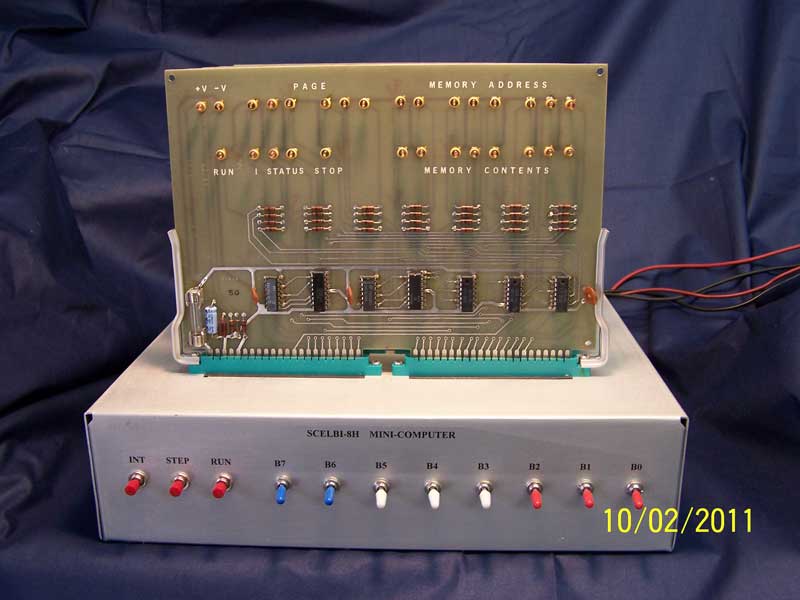
At this time, there are currently 6
mostly working controls available with this application. All other
controls either do nothing or react unpredictably.
- The Memory->Clear menu function will clear 8008 memory to zeros
- The Memory->Load menu function can be used to load 8008 memory
with an intel hex formatted file. I have a copy of scelbal (SCELBI
Basic) in this format available to download. Other 8008 programs could
be loaded, but the current assumption is that the PC is set to location
0×40 during reset.
- The
I/O->Byte mode menu function is used to set the terminal
emulation to either a bit banged mode or to a byte mode. The bit
banged mode is used to emulate a simple serial interface that is
completely timed and controlled by toggling and reading single bits on
the I/O port interface. The byte mode is used to emulate a UART
type serial inteface where bytes are read and written as a unit to
emulated UART registers. The mode is set to byte mode when the check mark is present next to this menu item
- The “INT” button will stop and reset the 8008, setting registers
to zero, except for the program counter which is initialized to 0×0040.
This is not the authentic use of the button, but it was handy for the
initial bare bones implementation of this emulator
- The “RUN” button will start the 8008, or if it is already running, do nothing.
- The
terminal section at the bottom of the window emulates either a UART or
a bit
banged serial interface compatible with drivers commonly found with
Scelbal. Input is expected to be in upper case. If this window does not
respond to input, either the 8008 is stopped, or not currently
monitoring the serial port or you have found a bug in the app. Note
that unlike a real serial port, input to the port from the keyboard is
queued to a length of 4K characters to allow cutting and pasting input
from other applications into the emulator. Overflow conditions are not
currently handled gracefully.
The SCELBI/8008 emulation app can be downloaded from
here. Ty it for yourself, but keep
in mind that the app is in early prototype stage. It is likely to
behave unpredictably, hang and/or crash from time to time.
The performance is throttled to approximately, the actual speed of a
500kHZ 8008. Load Basic and try executing a “FOR” loop of 0 to 100 to get an idea of
the incredibly slow performance of an 8008 running Scelbal. The first
version of the 8008 emulator that I had running in a Unix shell
environment was approximately 500 times faster than an actual 8008, and
even that felt slow!
Your host computer running the SCELBI application may get real busy, go
to sleep or suspends for a while. At this point, the
emulator will fall behind real time. When this happens, the
emulator will limit the catching up of the 8008 to actual elapsed real
time to a 5 seconds burst of cycles. In other words, if you put
your computer to sleep for an hour, when it wakes up, the SCELBI
application will give the emulated 8008 the maximum burst of 5 seconds
worth of cycles and other cycles will be lost.
.
The current implementation emulates the 8008 instruction by
instruction. If I find the time and energy, I’ll convert it to a cycle
accurate emulation and complete the hook up to the SCELBI front panel
depicted at the top of the app’s window.
Have fun with it and be sure to
let me know what you think.
SCELBAL (SCELBI Basic)
SCELBI implemented a Basic interpreter for the
8008. This could be run on a SCELBI that had 8K of memory.
Presumably few, if any, 8-H machines were ever upgrated to run
this interpreter. This interpreter completely supported
floating point math with 6 digits of precision. As time went on,
additional packages including maxtrix arithimetic and math functions
were added. This interpreter was also ported to the similar
Mark-8. For many purposes this Basic interpreter was far and away
superior to Apple’s integer basic.
To run Scelbal (basic), do the following.
- Download and unzip the SCELBI application
- Run the SCELBI app
- Make sure that the Byte I/O sub-menu under the I/O menu is disabled (no check mark next to this menu item)
- Clear 8008 memory (optional)
- Load 8008 memory with Scelbal.hex
- Click on the “RUN” button – you should see a “READY” message
- Type “SCR” – this clear’s Scelbal variables – if you don’t do
this before entering your program, weird things will start happening
- You can now enter a basic program or basic commands directly
Be aware that there are several common 2 character error messages in
Scelbal including “BG” for two big and “SY” for syntax error.
For fun, try booting up Scebal and running this program:
http://99-bottles-of-beer.net/language-scelbal-2472.html.
Once you have a the Scelbal ready prompt on your machine, copy and
paste the source into the terminal section the SCELBI
application. Then type run to run it.
Starshooter - a SCELBI Game as published in Byte magazine
http://www.vintagecomputer.net/stars.cfm
I have ported
the source to this game to make it assemble using the AS8 assembler found
here.
I also added a byte mode input/output driver compatible with my
simulator. The resulting intel hex file output can be found
here. To run, starshooter follow these instructions.
- Run the SCELBI application
- Make sure that Byte I/O sub-menu under the I/O menu is enabled (check mark is set next to this menu item)
- Clear 8008 memory (optional)
- Load 8008 memory with STARSHOOTER.HEX
- Click on the “RUN” button – the computer should prompt you for input and away you go
Note that though this game was apparently written on a SCELBI, the
author did not leave any registers available for processing a bit
banged serial port in the input and output calls. My assumption
is that he had some kind of UART interfaced to his SCELBI so that I/O
could be as simple as reading or writing a byte from an I/O register in
this UART. This is why I added the byte mode I/O capability to
the emulator. Without available registers, it was
impossible to control a bit banged type interface, without rewriting
portions of the main StarShooter program.