Archive for the ‘Vintage Computing’ Category

Say Hi At VCFse in the Atlanta Area

Monday, March 18th, 2013

This year, for the third year in a row, I’ll be leaving the family in the care of our dog, Toby, and be spending a weekend with fellow retro-computer hobbyists. Since this years VCFeast, had to be cancelled, I’ll be treking down to VCF southeast in Atlanta for the weekend of April 20 and 21st. These weekends are always fun, so I highly encourage everyone that might be interested in these things to make the effort to join us.

Here is the link with informaiton for that event.
http://vintage.org/2013/southeast/

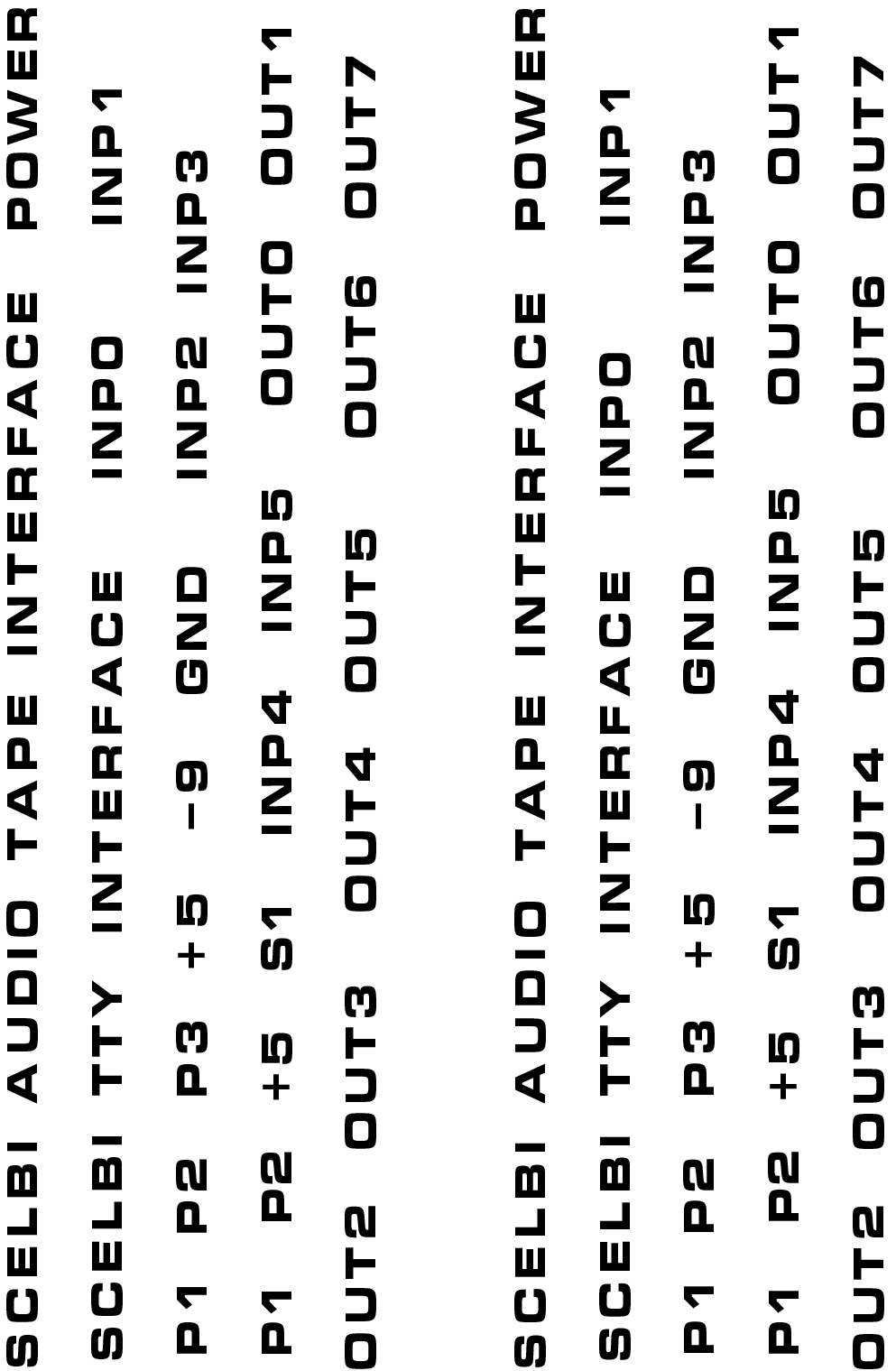
Stop by my exhibit. I’ll be operating a Mimeo 1 and a reproduction SCELBI 8H (one of a very few working SCELBIs in the world). I’ll even give you a chance to “drive”. Tell me you read my blog and get a free SCELBI/8008 reference card.

See you there…

Demo of SCELBI Generating Mandelbrot Images

Sunday, March 17th, 2013

Most of this video podcast shows me bootstropping the program into the system.

http://www.willegal.net/podcast3-17-13.mp4

One of the reasons I have posted this video is because there are virtually no videos on the web of anyone running an application on a SCELBI.

In case you don’t know about it, the feed for my podcast is at:
feed://www.willegal.net/feed.xml

Now to get cracking on the second 1K SRAM card….

SCELBI 1K Applications Running

Thursday, March 14th, 2013

Here is the output of a couple of applications, as captured on a terminal program on a Macintosh connected to my reproduction 8H via a RS232 interface.

100 digits of pi

100 digits of pi

The circles on top are part of the output of a concentric circle program that I will write about in a later post. The bottom is the output of a program written by Egan Ford that generates the first 100 digits of the constant PI. This program takes about 21 seconds to run.

Egan has been benchmarking various early 8 bit microprocessors using the generation of 1000 digits of PI as the benchmark. For the 8008, this benchmark needs 4K of memory. Since I only have 1K, at the moment, I asked Egan if he could reduce the scope of the program to fit in 1K. He was kind enough to take on this challenge and this is the result.

The source for the PI program can be found here:http://www.willegal.net/scelbi/pi1k.asm.

The binary, which can be downloaded to your SCELBI with the boot loader discussed in a previous post, is here:http://www.willegal.net/scelbi/pi1k.bin.

Original SCELBI 8B Surfaces

Wednesday, March 13th, 2013

This is the fourth 8B (B for business) that I have found out about. The original SCELBI was the 8H (for Hobby) and only supports 4K of memory. The 8B supports up to 16K of memory and a 4K PROM card.

The other three 8B’s are:

  • in a large private collection
  • one is still in the hands of an original member of the SCELBI development team
  • one is in storage at the Computer History Museum
  • At the present time, I don’t believe that any of them work perfectly. I know that two of them have SRAM issues, but probably would work if the SRAM issues were resolved.

    I’m looking forward to the day in the future, when I can say that I have reproductions of both the 8B and 8H running. However, I need to reproduce 4 additional boards before I can say that I have the 8B running.

  • New backplane
  • 4K SRAM card
  • 4K PROM card
  • Memory expansion card
  • As I am pretty busy with the 8H, at the present time, this is going to take some time.

    Dave Larsen's 8B

    Dave Larsen’s 8B

    This 8B was built up by the original owner from a bare board set that he purchased from SCELBI Computer. The board in the middle is a TV Typewriter card that was sold by “The Digital Group”. This is the only SCELBI that I know of with a built in video card.

    This one is in Dave Larsen’s collection and Dave provided the picture. Information about his collection can be found at http://bugbookmuseum.blogspot.com.

    SCELBI/8008 Quick Reference Card

    Friday, March 8th, 2013

    Let me know if you find any issues. Once I get more confidence that there are no mistakes, I’ll get some printed up on card stock.

    SCELBI/8008 Quick Reference,v1.0

    SCELBI boot loader

    Thursday, March 7th, 2013

    One of the challenges of working with the SCELBI 8H, which doesn’t have a built in monitor, is loading software.

    To address this, I have written a minimal serial boot loader that can receive serial data and write to memory. It takes a few minutes to toggle in the thirty-seven bytes, but it should save plenty of time, compared to toggling in an entire practical program. In the days of the SCELBI, the most common serial device was a TTY, that could dump data from paper tape at 110 baud using a current loop interface. This loader has it’s timing loops configured to receive 8 bit data at 2400 baud, but some hobbyist may want to retime to run at a TTY’s 110 baud.

    This loader will work with a current loop or RS232 interface, depending upon what is connected to the TTL input port 5, bit 8. In my case, I connected a TTL to RS232 dongle that I had built for another task. This dongle is very simple. It consists of a MAX202 chip, some capacitors and some connectors. The other side of the dongle is connected to a modern PC, which can be used as a terminal and a source for dumping data to the SCELBI. Eventually I plan on building reproduction SCELBI current loop boards for those that want to interface to a TTY or other current loop device.

    This loader is assembled to run from location zero, but it would be trivial to move it elsewhere.

    Here is the listing for the minimal loader.


    INPUT:
    000:113 INP INPORT
    001:240 NDA ; check start bit
    002:160 000 000 JTS INPUT
    005:026 010 LCI 8
    TIMER: ; 1 1/2 bit times
    007:021 DCC
    010:110 007 000 JFZ TIMER
    013:036 010 LDI 8 ; grab 8 bits
    DATAIN: ; get 1 bit
    015:113 INP INPORT
    016:022 RAL ; move to carry
    017:301 LAB ; fetch current byte
    020:032 RAR ; shift in this bit
    021:310 LBA ; save in B
    022:026 003 LCI 3 ; delay 1 bit time
    BITTMR:
    024:021 DCC
    025:110 024 000 JFZ BITTMR
    030:031 DCD ; 8 bits captured?
    031:110 015 000 JFZ DATAIN ; no, continue
    034:371 LMB ; store byte
    035:060 INL ; increment pointer
    036:110 000 000 JFZ INPUT ; wrap?
    041:050 INH ; increment MSB
    042:104 000 000 JMP INPUT ; continue

    Here are the instructions:

  • Toggle in program with front panel
  • Set source to 2400, 8 bits, no parity
  • Set H and L with panel to start addr
  • Set PC to 0
  • Run
  • Send data from source
  • Interrupt when data has been sent
  • Decrement address
  • Using panel, check last byte with LAM
  • In the next few days I’ll put together “put char” and a “get char” routines that will also run over the 2400 baud, 8 bit interface. These will be used as the I/O drivers for downloaded apps, and should be combined with any app that is to be downloaded.

    One last thing. The SCELBI is very tolerant of CPU clock speeds, but for this loader to work correctly, the CPU clock has to be very close to 500KHZ. If your recieved data is garbled, there is a good chance your CPU clock is not correct.

    SCELBI Base PCB Checkout Complete – If You Were Not Part of the Early Adopter Program, You Can Order Your Board Sets Now

    Sunday, March 3rd, 2013

    With I/O testing complete, I can’t think of any other tests to run and I declare testing of the 6 SCELBI 8H reproduction PCBs, complete.

    The only issue found in this set of boards, is a minor issue with hole size for the Zener diodes as documented here.

    With the completion of testing, I’m opening regular ordering at a price of $300 for the six board set. For an extra $35, you can also order a D8008 processor (the 8008 is only available with board set orders).

    Please send an email to mike@willegal.net for detailed ordering information. As a bonus, while supplies last, I’ll throw in a scrap, non-functional, backplane PCB that can be used for backplane/chassis mock up work.

    Right now I’m limiting sales to 1 SRAM card (1K) per board set, but once I sell a few more board sets, I’ll get another batch of SRAM PCBs made, and open up SRAM PCB sales independant of the board sets.

    Card Guide Caution

    Sunday, March 3rd, 2013

    The traces on many of the SCELBI PCBs travel very close to the edge of the board and the card guides. Since the boards do not have a solder mask, it is possible that one of these traces could short out with the metal card guides. Though the card guides are not electrically connected to anywhere else, this potential for accidental shorts should be avoided. After inserting the cards, I carefully checked for shorts. The only card that has a trace actually touching a card guide, is the input card. To prevent accidental shorts I insulated this connection with masking tape, as shown here.

    Input Card Potential Short

    Input Card Potential Short

    I also checked to make sure that I hadn’t made a mistake in my layout, but the original cards also appear to have this potential issue. See this crop of the image of an original input card from http://www.olson-ndt.com/Scelbi/

    Input Card Right Edge

    Input Card Right Edge

    Input Port Testing Also Successful

    Saturday, March 2nd, 2013

    The six input ports on the SCELBI each have an independent 8 bit data bus that is not connected to anywhere else, except that ports dedicated input circuit. Like the output ports, the input ports are also implemented using 78S11 sockets and 86CP11 plugs. The sockets contain 1 ground wire at pin 11 and 8 data wires from pins 1 through 8. There is nothing connected to pins 9 and 10.

    Since 9 is not connected, I decided to reuse the test cable I made for output port tested, except change around the breadboard to control input lines, instead of monitor output lines with LEDS.

    Input Port Test Rig

    Input Port Test Rig

    In this case I connected the 8 data lines to 1K ohms pulled up to 5 volts. Since 5 volts doesn’t exist on the cable, I wired the 5 volts from my 5 volt power supply. Using a series of 8 DIP switches I could connect any one of these lines to ground, as I pleased.

    Now I basically repeated what I did for the output port test, only using the INPUT instruction and dumping the contents of the accumulator to memory to verify that the read was successful.

    Input Port Test

    Input Port Test

    Note that after running this test, I realized that the input signals are already pulled up on the input board, so the pullups in the test rig aren’t actually necessary.

    Output Port Testing Successful

    Saturday, March 2nd, 2013

    The SCELBI has 8 output ports. Each port is implemented with an Amphehol 11 pin 78S11 female socket. The sockets are still available, but tend to be expensive, often $12 or $13 dollars or more. Each port is connected to the SCELBI 8 bit data bus (pins 1-8), system ground (pin 11) and a strobe signal (pin 9). Pin 10 is left unconnected.

    The 8 bit data bus, as the name suggests is bussed across all 8 output ports and to the rest of the computer. The ground is also connected to the backplane system ground. The strobes are unique for each port. This is, in fact the only difference between each output port. Output hardware must latch the data bus when the strobe signal is seen on that port.

    The mating plug is another expensive connector, called an 86CP11. Here are front and back images of an 86CP11.

    front 86CP11 plug

    front 86CP11 plug

    Back 86CP11 Plug

    Back 86CP11 Plug

    It took me a while to figure out how to solder wires to this connector. I used 22 gauge solid conductor hook up wire. You strip about 3/8″ from one end (give or take) and stick the wire into the tip from the back of the connector until the conductor comes out the little hole at the end of the tip. I then bent the conductor over a bit so it wouldn’t slip back in and soldered from the tip of the plug. Then I carefully cut the excess conductor off. I’m sure some old hand will send me an email, saying how I’m doing it all wrong, but it worked for me.

    I didn’t have 10 different colors of wire, so I used black for ground, red for the 8 data lines and green for the strobe.

    For output port testing purposes, I connected the other end of the wires to breadboard. Each wire was connected to a LED which was connected to ground through a 1K resistor.

    Output Port Test Rig

    Output Port Test Rig

    Now by writing data to the output port, I visually check each line, including the strobe, by executing simple code fragments. I plugged the test rig into port 0 and powered up the SCELBI. I loaded this simple code fragment into memory, starting at location 0.

    OUT 0
    JMP 0

    Next I manually loaded the accumulator with the data I wanted to write by jamming in a LAI instruction and then jammed a JMP 0 instruction. I then stepped through the little loop, watching the LEDs on the test fixture. I then tried a few other data patterns by putting different patterns in the Accumulator and rerunning the test. Then I moved the connector to the next output port and loaded location zero with the OUT 1 instruction. I repeated the test for this port and the remaining output ports.

    Output Port Test

    Output Port Test

    Everything checked out perfectly and I’m declaring the output port logic in perfect working order.