Archive for the ‘Vintage Computing’ Category

Mimeo 1 Availability in the Future

Wednesday, August 10th, 2011

Here is how I currently manage Mimeo 1 kit availability.

  • In order to keep costs down, I restock component parts only when I run low or completely out of parts. Number of kits available, depends upon if I just ran out of some component or another, and how low the inventory is of all the rest of the required components. Keep in mind that there are 69 different component types in a Mimeo, so I’m usually running low on something. I rarely have on hand complete part kits for more than 3 or 4 units at a time. Frequently I’m down to one or two kits of parts on hand. The good news is that most part types can be restocked within a month.
  • Even though the volume of kits sold is very low, this process is very time consuming. Just as bad for me, the effort required is very dependent on the frequency and timing of Mimeo 1 kit purchases. This makes it very hard to make consistent progress on new projects (like the Scelbi).

  • I would love to move to a batch system, but component availability is so erratic for some of the more hard to find components, that often I will jump on an opportunity to buy a cache of those components at a good price. This makes putting together batches of kits hard to do, since the size of inventory of the various component types is all over the map. Instead of making batches, starting next year, I’ll will probably be less aggressive about keeping Mimeo kits available, especially if I’m busy with a new project. So what I’m saying is that starting next year, Mimeo kits are just as likely to be out of stock as in stock. And they may stay out of stock for a while, if I’m busy trying to make progress on a new project.
  • Scelbi 8H/8B- looking for information

    Tuesday, August 2nd, 2011

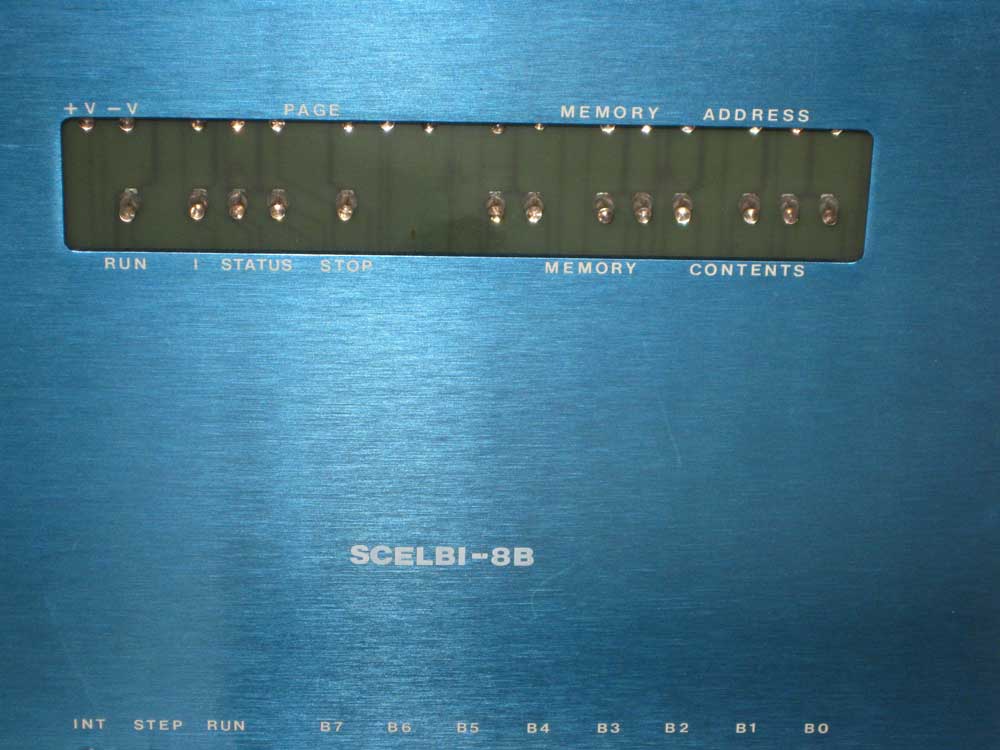
    I’ve been bitten by the Scelbi bug and am working with a small team of folks to seriously investigate the possibilities of doing a limited edition reproduction of the Scelbi 8H and/or 8B.

    Data mining on internet and preliminary “networking” has yielded some good scans of the the main plug in cards, some schematics, scans of the Scelbal manual, etc. However I’m still looking for more information, in particular detailed information on the following.

    1)power supply
    2)TTY interface
    3)cassette interface
    4)the oscilloscope output interface
    4)backplane and I/O connections
    5)software
    6)differences between the 8H and 8B
    7)ROM cards
    8)main and expansion enclosures
    9)documentation

    If you have any information on any of the above, or want to contribute in other ways, let me know.

    While we gather information, I will continue to work on the Mac OS/X 8008/Scelbi emulator. See my recent blog post for information on this emulator.

    http://www.willegal.net/blog/?p=1705

    Brain Board Assembly video

    Saturday, July 30th, 2011

    Check it out – done by one of the folks that picked a kit up up at K-fest.

    http://www.ustream.tv/recorded/16320592

    Version 0.1 (pre-alpha) OS/X Scelbi emulator available

    Saturday, July 30th, 2011

    For the past several months, I have been working on a Scelbi/8008 emulator for Mac OS/X. Here is the first published screen shot of the running app. In this shot it is running Scelbal (Scelbi 8008 Basic).

    Scelbi App version 0.1 Screen Shot

    Scelbi App version 0.1 Screen Shot


    At this time, there are currently 5 mostly working controls available with this app. All other controls either do nothing or react unpredictably.

  • The Memory->Clear menu function will clear 8008 memory to zeros
  • The Memory->Load menu function can be used to load 8008 memory with an intel hex formatted file. I have a copy of scelbal (Scelbi Basic) in this format available to download here. Other 8008 programs could be loaded, but the current assumption is that the PC is set to location 0x40 during reset.
  • The “INT” button will stop and reset the 8008, setting registers to zero, except for the program counter which is initialized to 0x0040. This is not the authentic use of the button, but it was handy for the initial bare bones implementation of this emulator
  • The “RUN” button will start the 8008, or if it is already running, do nothing.
  • The terminal section at the bottom of the window emulates a bit banged serial interface compatible with drivers commonly found with Scelbal. Input is expected to be in upper case. If this window does not respond to input, either the 8008 is stopped, or not currently monitoring the serial port or you have found a bug in the app. Note that unlike a real serial port, input to the port from the keyboard is queued to a length of 256 characters. Overflow conditions are not currently handled gracefully.

    You can download a copy of this app and try it for yourself, but keep in mind that the app is in early prototype stage. It is likely to behave unpredictably, hang and/or crash from time to time.

    The Scelbi/8008 emulation app can be downloaded from here.

    To run Scelbal (basic), do the following.

  • start the Scelbi app
  • clear 8008 memory (optional)
  • load 8008 memory with Scelbal.hex
  • click on the “RUN” button – you should see a “READY” message
  • type “SCR” – this clear’s Scelbal variables – if you don’t do this before entering your program weird things will start happening
  • you can now enter a basic program or basic commands directly
  • Be aware that there are several common 2 character error messages in Scelbal including “BG” for two big and “SY” for syntax error.

    The performance is throttled to approximately actual speed of a 500kHZ 8008. Try executing a “FOR” loop of 0 to 100 to get an idea of the incredibly slow performance of an 8008 running Scelbal. The first version of the 8008 emulator that I had running in a Unix shell environment was approximately 500 times faster than an actual 8008, and even that felt slow!

    The current implementation emulates the 8008 instruction by instruction. If I find the time and energy, I’ll convert it to a cycle accurate emulation and complete the hook up the Scelbi front panel depicted at the top of the app’s window.

    Have fun with it and be sure to let me know what you think.

    Wozanium Pack Source Code and Rom File Suitable for A2 Emulators Released

    Thursday, July 28th, 2011

    Ken Gagne was kind enough to take some Brain Boards out to K-fest and sold them at the vendor fair. Do to these extra K-Fest sales, I’ve now managed to cover my costs in producing the “Brain Board”. Thanks to everyone that has purchased one (or more) of these units.

    Because I’ve covered my cost, and it might be interesting to some folks, I’m now releasing the source code for the Wozanium pack.

    Also included, is a ROM file suitable for emulators, such as Virtual II. This allows you to run and debug Apple 1 software in the Apple II emulator environment. Just select the .ROM file as the ROM for your machine and reset your virtual machine. Just as in the Brain Board, right arrow will clear the screen. With Virtual II, you can download AIF files of A1 basic and assembly language programs and run them in your emulated Apple II, using the emulated cassette interface built into Virtual II. Note that this ROM version does not include the ACI driver at C100, so you must enter the Cassette driver by entering “D000R”, instead.

    You can build the source with the 6502 DASM cross assembler.
    Use the following command line:
    “dasm a2a1emulv5_1.asm -DBLD4ROMBD=0 -DHUSTNBASIC=0 -oa2a1rbh.o -la2a1rbh.lst”

    Included in this zip is

    * a1basic-universal.asm – Apple 1 BASIC modified to run on Brainboard/Wozanium (note copyright at beginning of this file)
    * COPYING.txt – GNU lincense for rest of Wozanium pack
    * a2a1emulv5_1.asm – Wozanium source code
    * a2a1emulv5_1.lst – Listing
    * a2a1emulv5_1.o – Object file
    * a2a1emulv5_1.rom – 12K rom file that can be used with A2 emulators, such as Virtual II.

    Click a2a1emulv5_1.zip to download Version 5.1.

    More about the Brain Board can be found at:
    http://www.willegal.net/appleii/brainboard.htm

    A 6800 based Apple-1 in the future?

    Monday, July 18th, 2011

    Looks like Eric of http://whats.all.this.brouhaha.com/ is working on a 6800 Monitor for the Apple 1. Several people have talked to me about doing this in the past, but it looks like Eric is really doing it as part of the annual retro-challenge. The obvious question is whether Eric or someone else will configure a physical clone of an Apple 1 for a 6800 and see if the hardware really works as designed.

    Only 2 Replica Datanetics PCBs left

    Saturday, July 9th, 2011

    It is highly unlikely that another run of these will be made. Checkout my Datanetics webpage and the Datanetics catagory of this blog for more information.

    Also, on a related note, it appears that littlediode.com has MM5740/AAE keyboard encoders in stock.

    Whacky 8008/Scelbi Emulator Project

    Wednesday, June 22nd, 2011

    Before I actually build a pilot batch of the Hobby cards that I have been designing, I need some pilot projects to try it out with.

    One of these projects is kind of off the wall. I’m working on an 8008/Scelbi emulator that runs in a Unix type shell. Eventually I’ll port this to the 6502 and be able to run it on the Apple II. The 1MHZ 6502 in the Apple II is well over 5 times faster than an 500KHZ 8008, so this isn’t as crazy as it first seems.

    Eventually a brain board version seems like it would make sense. In order to get the full Scelbi effect, I’ll also need to build a replica Scelbi front panel. This is where the hobby board comes in – as the hobby board becomes the interface to the replica Scelbi front panel from the Apple II runing the Scelbi emulator in the brain board. wow -I’ll be surprised if anyone made sense of that last statement when they first read it.

    If you don’t know what a Scelbi is, check out the wikipedia entry.

    Apple 1, noise on -5 volt supply

    Thursday, June 9th, 2011

    I’ve noticed long ago that there is a significant amount of noise on the -5 volt supply on the Apple 1. The -5 power supply is connected to 16 4096 DRAMs, 7 2504v shift registers, and the 2513 character generator, 24 chips in all, spread around the board. Beside a 22UF cap next to the voltage regulator, there is only 1 .1UF decoupling cap connected to this supply.

    Apple 1 - minus five noise

    Here is an oscilloscope picture of this noise. Frequency of this trace is set to 5 micro-seconds/division. Top trace is -5 taken directly from a DRAM chip. Scale is .5 volts per division. Bottom trace is RAS taken from same DRAM chip. Scale is 2 volts per division. You can see that some of the noise on the -5 supply is being generated directly by RAS switching. This working system exhibits over a .5 volts of noise on the -5 supply to the DRAM chips.

    Last month, while bringing up a new Mimeo 1 board, this excess noise on the -5 volt supply became a problem. This board exhibited intermittent memory write failures, with writes of zero bits occasionally failing. The bit would end up reading back as a one sometime later in time. It took me quite a few hours of debugging to figure out that the problem was due to all the noise on the -5 volt supply. The fix turned out to be a simple replacement of the single .1 UF decoupling cap on the -5 supply with a different .1 UF cap.

    For those of you that don’t know, decoupling capacitors are typically distributed around boards that have digital circuits to limit surges in power demand from one chip from affecting the power supply to other components. The capacitors act as small power sources that can supply small amounts of power to nearby chips as the power demand from these chip changes due to switching logic levels. A commonly used ratio of decoupling caps to chips on a typical +5 volt TTL design is 1 decoupling cap to 2 74LSXX parts. I’m not sure what the ratio should be for -5 volt supply in a MOS design, but the Apple 1 implementation is clearly insufficient and results in a lot of switching noise on the -5 power supply.

    Capacitors are rated for deviation from the specified value. Typical variations for the ceramic disc capacitors used in first batch Apple 1s are +80/-20. In order to optimize putting a higher value capacitor in this location, I built a simple capacitor tester. Future Mimeo kits will have a separately packaged .1UF ceramic disc capacitor that tested as having a value towards the higher end of the range seen. I recommend using this cap at location B13, which is the -5 decoupling capacitor.

    Which Apple Interpreted Basic is the Fastest?

    Saturday, May 21st, 2011

    While at the vintage computer festival, I had an Apple 1, an Apple II with integer BASIC and an Apple IIplus with Applesoft all up and running.

    At one point late in the afternoon on Sunday, I decided to have a simple performance contest between these machines. This is the program.

    10 FOR I = 0 TO 10000
    20 NEXT I
    30 PRINT “DONE”
    40 END

    Two machines were matched against each other and the program started at the same time on both machines. The first to finish was the winner.

    After several heats, here are the results.

    1st place – Apple 1 – by a little
    2nd place- Apple II
    3rd place – Apple II plus – way behind

    At first, I was confused by the Apple 1 beating the Apple II, as the Apple II should run about 5% faster than an Apple 1. This is do to the more efficient method for refreshing memory on the Apple II. The Apple 1 stops processor clocks while refreshing, while the Apple II uses unused portions of the 6502 bus cycles to refresh memory (and read video display data). Integer BASIC on the Apple II is a direct development of Apple 1 Basic, so I was thinking that the performance would depend on the processor, not the Integer BASIC implementation, which were basically the same.

    After a while I realized that Apple 1 BASIC might be a little simpler than Apple II BASIC and thus faster. I ran a second test. In this test, I booted the A2plus that I had there at the show into Apple 1 mode, with the Brain Board/WOZANIUM and ran the test against the original Apple 1. Both machines were now running virtually the same version of BASIC. In this case, the Apple II beat the Apple 1 by the expected amount. Thus, Apple 1 BASIC running on an Apple II, is the fastest version of Apple BASIC.

    However, keep in mind that if print statements are added to the loop, the Apple II will beat the Apple 1 by a substantial amount.