SCELBI 8B update

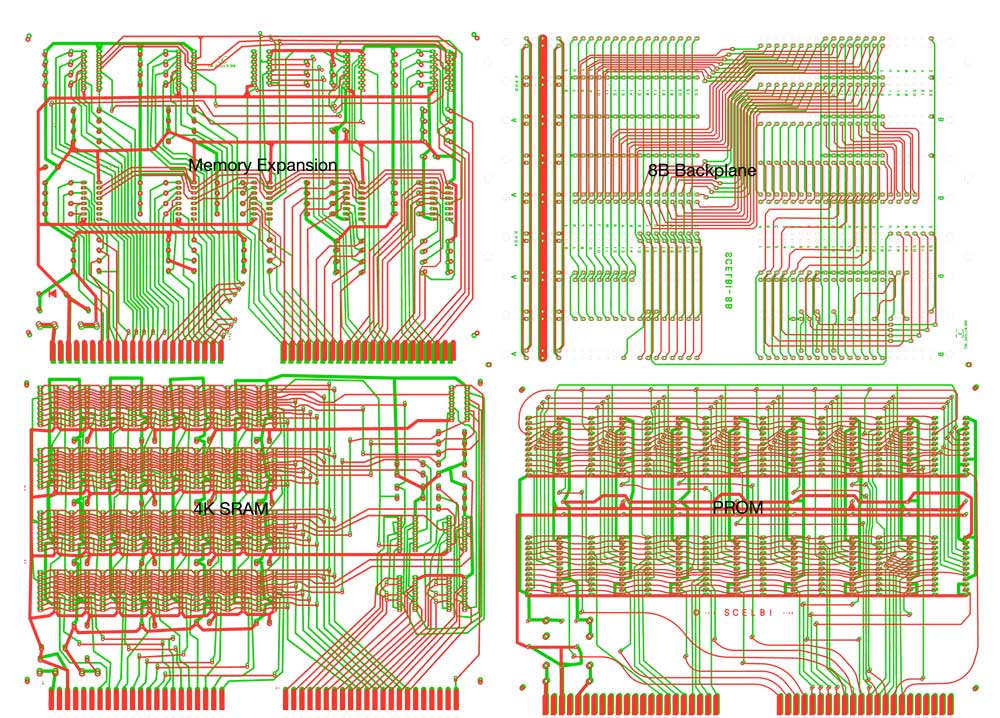
Here is a composite image showing the great progress that has been made on the 4 boards that need to be done for the SCELBI 8B.

Composite Image of 8B Boards

Composite Image of 8B Boards

Still a ton of tweaking and fine tuning needs to happen, but you can almost see the light at the end of the tunnel. I also need to find some time to figure out what I’m going to do for the custom chassis.

The backplane layout is for all intents and purposes done. The memory expansion card is next closest to complete. I haven’t done much with the PROM card, but I’ll do a complete review of it. The curved traces promise to require a lot of effort to match up to the original. The 4KSRAM cards need a lot of work and since the original has curved traces, it will take an extra effort to finish.

Brain Board Manual Errata

I have a mistake in my Brain Board Manual versions 5.3 (current version) and lower. On page BB:12, the last switch settings are incorrect.

Dual Bank Mode – Either high bank of Brain Board or low bank of Brain Board is selected

should be:

1-ON
3-OFF
4-ON

5-ON
6-OFF
7-ON
8-OFF

Switch 3 and 4 settings are backwards in the manual. When I get a chance I’ll update the PDF that is on my Brain Board web page. I already printed manuals for the remaining inventory of Brain Boards, so will hand edit those manuals.

SCELBI 8B Backplane Progress Being Made

Lately. I’ve been making some good progress on the 8B backplane. Hopefully in a few more weeks and I’ll have it in good enough shape in order to declare it finished. I’ll probably just go ahead and get it made when it’s ready, even though I have a lot of work to do on the other 8B specific cards.

There is quite a bit involved in building an 8B chassis and 8B builders can start on the chassis while I finish the rest of the cards. Anyway the CPU can be checked out by jamming in instructions, without memory being present. The front panel, CPU, DBB, and input boards are completely identical to the 8H design and I still have some of those PCBs in stock.

One thing I’m going to have to think about a bit, is whether to make a batch of SCELBI custom sized chassis or not. A BUD AC413 can be made to work, as it is nearly the correct size, just a 1/2″ short, other dimensions being right on.

Status of the other 8B specific cards are:

  • memory expansion – I haven’t started on this one, but it is the most basic of the 8B specific cards, so should take the least amount of time to do
  • 4K SRAM- designed to accept 2102 static ram – this card is pretty far along, maybe half done.
  • EPROM – designed to accept 1702 EPROMs – I have a tested, working layout for this card done by someone else. The original layout artist did a good job, but there are a few things I want to change. I will completely go through it to make the layout details match the original as much as possible.
  • Why Does Someone Recreate the Apple 1 in Exacting Detail with Original Parts?

    This is the essence of a question someone asked on Applefritter.

    Here are my thoughts on this topic.

    It’s really not that complicated, people do this stuff cause it’s fun for them. This hobby is not for everyone. It’s about personality, if you don’t get it, you either haven’t been exposed to enough of the possibilities, or you have a different personality.

    This question is really applicable to many different vintage systems with similar followings – the Apple 1 gets a lot of press because it’s the very first computer of a very successful company that, at the moment, happens to be near the top of it’s game.

    There are three main activities in this hobby, with a little different motivation for each.

    1) The collector – For some people, it is a lot of fun to own an item of significant historic value.
    2) The operator – For some people, it is a lot of fun learning how to build or restore and operate a vintage computer.
    3) The developer – Some people find it fun to expand the capabilities of vintage computers, providing capabilites to vintage machines that could not be dreamed of, back in the day.

    There is a lot of crossover between the people participating in each of these activities.

    For some of the rarer computers, you may decide it’s better to use a reproduction, rather than risk damage to an original machine or you may not be able to find or afford an original machine.

    The reasoning behind installing date code original parts and making the reproduction as accurate as possible, is two fold.

  • First- tracking down these parts is like a scavenger hunt and can be a lot fun in itself.
  • Second- making a reproduction more like an original, raises the level of pride and satisfaction in the end result to a significant degree.
  • In case you are trying to decide whether you might enjoy the hobby or not, consider this: how could you decide whether you might or might not like swimming, without going in the water?

    Vintage Humor

    I found this in Volume 1 – Issue IV of the SCELBI Computer Digest, which can be found online at scelbi.com.

    THE NAVAL ADMIRAL HAD JUST PURCHASED A MINICOMPUTER TO HELP HIM RUN HIS MIGHTY FLEET. HE QUICKLY UNPACKED HIS UNIT, SET IT UP IN HIS STATE ROOM, PLUGGED IT IN, AND WITHOUT WASTING ANY TIME.. PROCEEDED TO ASK HIS NEW COUPUTER AN INPORTANT QUESTION.

    “WILL THE WEATHER BE SUITABLE FOR LAUNCHING PLANES FROM MY AIRCRAFT CARRIER TOMORROW – OR WILL IT RAIN?”
    “YES.” ANSWERED HIS NEW LITTLE BRAIN.
    “YES WHAT?” SHOUTED THE EXASPERATED ADMIRAL.
    “YES SIR!!” PIPED UP HIS LITTLE MINI.

    Proposed PS/2 Keyboard Adapter Stretched Strobe Change

    As I mentioned in a previous post, my PS/2 keyboard adapter requires some strobe stretching in order to work with some kinds of early microcomputers, such as some OSI models.

    I think I have come up with a convent way to accomplish this, with only a small firmware change.

    Here is what I have in mind.

    As before, when the CR jumper is inserted, it disables recognition of the CNTRL-RST and CNTRL-CLR keyboard/RS232 sequences, which assert the reset or clear screen outputs, as appropriate. With my new design, in addition to disabling the aformentioned reset and clear sequences, inserting the jumper will change the clear screen output to an input. Now here is the key part of the change; whenever a character is typed and strobe is asserted (high true), if the CR jumper is inserted, strobe will remain asserted until:

  • minimum of 125 useconds have elapsed AND
  • the input to the clear I/O port is asserted (also high true)
  • To maintain current behavior (a 125uSec long pulse), you just need to tie the strobe output directly to the clear input.

    In order to stretch strobe out a bit, you have a few options:

  • Tie strobe output to clear input through an RC timing network in order to slow down the response to the clear input. For example – connect strobe and clear together with a 10K resistor. Then connect the clear input side of the resistor to a 1 uF capacitor and connect ground to the other side of the capacitor. Doing a basic RC timing equation shows that this should yield a delay of approximately 10 milliseconds. Change the values to attain a strobe length that meets your requirements. You do have to be careful to limit current through the resistor, so you don’t blow the strobe transmitter, though.
  • Use external logic of your choice to assert the clear signal to the PS/2 adapter
  • Behavior with the CR jumper disconnected is exactly the same as with the previous version of firmware.

    The main assumption behind this change is that the clear output, is only required for the Apple 1. I have found little to no need to disable CNTRL-RST and CNTRL-CLR on the Apple 1 (or Apple II) and those features are probably of little value to other platforms. In any case, the PS/2 keyboard sequence of CNTRL-ALT-DEL will still assert reset no matter whether the CR jumper is in place or not. In fact, using the CNTRL-ALT-DEL combination from a PS/2 keyboard will be the only way to assert reset if a system needs both reset AND a stretched strobe output. Said another way, you will not be able to assert reset from a device connected with the RS232 port, if your system also needs a stretched strobe.

    I’ll do some trials over the weekend and assuming that it works ok and I get no better input or ideas, I’ll have a new version of the firmware available very soon, possibly as soon as next week.

    PS/2 keyboard adapter used with Ohio Scientific Computers at VCF

    It took a modification, but Bill Dromgoole was using my PS/2 to parallel keyboard adapter in his display of OSI computers at VCF east 9.1. (The link to the image of Bill’s setup from the Vintage Volts blog). The modification was to stretch the strobe output with a 74123 one shot IC.

    kb_adaptor
    PS/2 to parallel keyboard adapter

    I didn’t anticipate this when I made the design, but some vintage computers poll the strobe directly with software routines, while waiting for new input. My design assumed that strobe would be used to latch a flip flop (or equivalent), which would be reset by software when it actually read the character. I’m not sure how long Bill stretched the strobe, but with an 74123, it’s easy to adjust the pulse. Another person, told me at VCF that did the same thing to make the adapter to work with his vintage system. Unfortunately, I can’t remember who the second person was.

    At some point, I’ll probably look into stretching the pulse in firmware, or at least adding a configuration option to stretch the pulse.