Archive for the ‘Vintage Computing’ Category

Tektronix 465 repair

Thursday, January 22nd, 2015

SCELBI clocks

SCELBI clocks


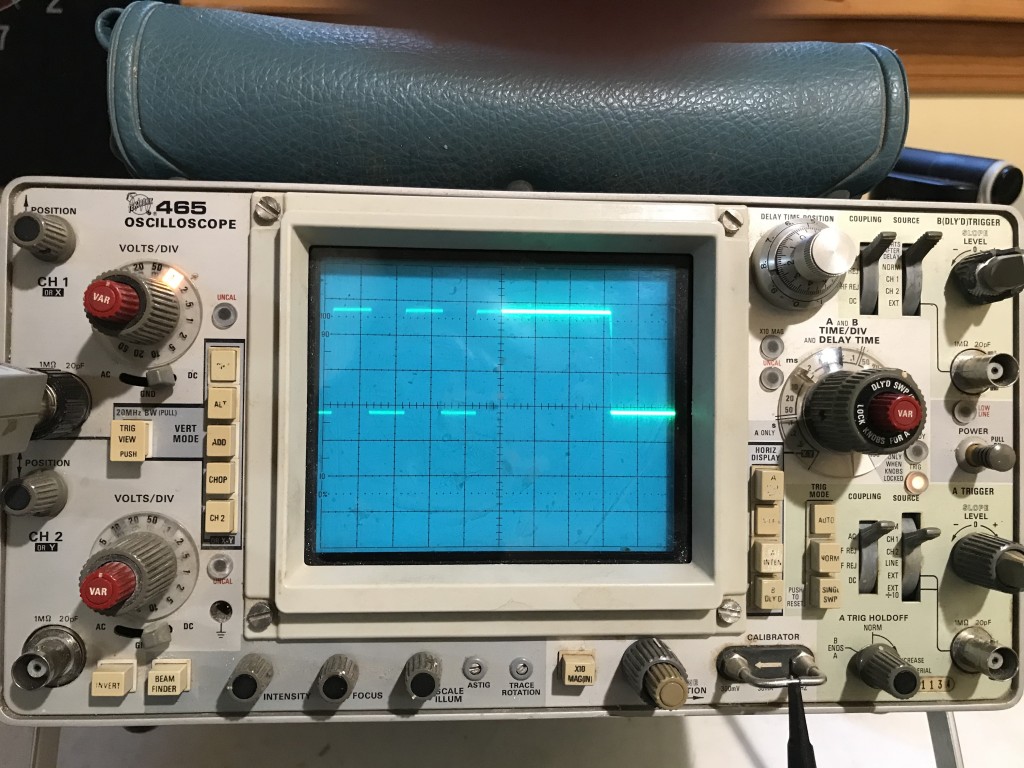
Those of you who have followed my blog probably know how much I rely on my Tektronix 465 dual channel oscilloscope. I don’t own a modern scope or any logic analyzer at all. This scope is my main go to device, when more information is needed than what a simple DMM can provide.

Sunday, right at the end of my dummy load exercise, a serious issue with the faithful 465 suddenly appeared. At that point, the main trigger level control failed to function. I could no longer set the trigger “A” level, which pretty much makes this scope useless.

Before I go into what happens next, I’ll describe a little history of this unit. Prior to Sunday, my treasured 465 had a couple of other, less important problems.

  • The “B” trigger slope switch didn’t work properly, so the “B” trigger would only trigger on down slopes.
  • The horizontal position knobs didn’t work very well. The coarse knob sort of worked, but the fine knob was useless.
  • The “B” trigger level and slope control was damaged when the scope was shipped to me and the scope took a hit to the front corner. I disassembled the switch and straightened the bent components when I first got the scope and got it working. My repair was less than perfect, and after a bit of usage, the slope switch broke again. I don’t use that feature very much and didn’t bother to fix it again until a couple of months ago. I decided I wanted it to work right and I went in and fixed the slope switch again. This time, I think I bent the sheet metal just right and the switch worked just like new when I was done. If you are handy, these switches are surprisingly repairable, but you need to tweak things, just right. Even though I fixed the switch, itself, the slope function still didn’t work. It still only triggered on the down slope. There must have been some kind of problem in the circuit. Anyway, being a little intimidated by the apparently complexity of the electronics in this scope, I decided to leave good enough alone, and left the “B” trigger control in the broken state.

    The other issue was that the coarse horizontal position control was always a bit jumpy. It worked well enough that I could position the start of the trace in the general area that I needed it, but it wasn’t a pleasure to use. The fine control was just about useless, since I first received the scope.

    There is one other issue with scope that showed up in the last few weeks. I think it started with a rather large cup of coffee that I spilt on my work bench. I cleaned it up, but I didn’t realize until a week or so ago that some of the coffee had dripped off my bench onto the front of the scope which is kept stored on the floor right next to that bench. Well, when using the scope a week or so ago, I noticed that controls were incredibly sticky. The buttons were most noticeably sticky and I had to force them to move. It was very puzzling, until I remembered spilling the coffee. At that point it had all dried up and there was little I could do, except keep using the scope and hope the controls would loosen up over time. The alternative would be to disassemble the scope and clean the controls. Do to the complexity of construction of this device, this is something that I was hesitant to undertake.

    That brings us up to last Sunday, when the trigger level control malfunctioned.

    to be continued…

    Brain Boards Sold Out – summary of pending projects

    Friday, January 9th, 2015

    I built and tested the last two kits over the holiday break and sold them on eBay. I made 59 PCBs, and kept 1 for myself, so there are 58 that were sold, either as kits or fully assembled.

    Once the initial interest passed, they were very slow sellers, so I’m not expecting to make any more. I have some ideas for an enhanced version, but that is very far down my list of things to do, so I don’t know if or when I’ll take the time to work on that.

    Here are just a few projects on my backlog that are ahead of the enhanced Brain Board. These will easily keep me busy for a couple of years or more.

  • Finishing all the SCELBI I/O Boards
  • Getting Apple II RTTY on the air – reception is working – transmission software is coded, but needs lab testing prior to actual “on air” tests
  • Getting vintage computer Morse code encoder/decoder on the air – Jack Rubin sent me an early Byte Magazine article with a 8008 software package for this, so I’ll probably do this on the SCELBI
  • Fabricating SCELBI Chassis Components
  • Putting together the VCF East 10 display and “Fix It” lecture
  • Hack together a Mimeo with 20K DRAM
  • Move Apple II RTTY application to the Mimeo/Apple 1
  • I have identified another board that is rare, of historical significance and worthy of replication
  • I have other ideas, that are even further out, such as doing a Mark-8. If I did a Mark-8, I would probably etch my own boards. This would probably be pretty easy to do, as the artwork was published and there was no solder mask and the holes were not plated through. I don’t think I would make batches of boards for sale, as this has been done already, and some of the parts are in the harder to find category.

    I also really need to do a manual/book on the SCELBI and I have made some half hearted attempts to start this. The main obstacle is that I’d want to scan and OCR the original docs and that is a very laborious process.

    ExTech EX-330 multimeter snapshot review

    Tuesday, January 6th, 2015

    Cutting to the chase, I’m a bit disappointed with this multimeter. I bought it primarily based on low price, features and relatively good review in Dave Jone’s EEVblog #91.

    The Ohm, DC volts and Diode check function work as expected. Some of the other features don’t work as well as I had hoped.

  • AC volts doesn’t work in millivolt range
  • Capacitance tester is basically unusable, except for a very small range of smallish caps
  • My sub $100 Tek 465 oscilloscope can be used for checking AC volts, though accuracy is approximate.

    The Fluke counter I picked off of eBay and repaired for around $40 is vastly more accurate and usable for frequency readings.

    At some point, I’m going to have to pick up a more capable capacitance tester, but in the past I have hacked one together out of spare parts on the few occasions when I really had to have one.

    For the features that do work well, the ergonomics of the EX330 are quite nice, much better than the $29 unit that it’s replacing.

    Bottom line – you get what you pay for, though I’m starting to believe that if it works or can be repaired, there can be some real bargains found in the vintage test gear marketplace. :-)

    Improved Apple Teletype Emulation

    Wednesday, December 31st, 2014

    A previous post showed how I attempted to connect the SCELBI TTY to an Apple IIe with an old serial card that supported current loop. Well I’ve been working on some of the issues and now have it working good enough to post some of the details. With the standard Apple 80 column scroll routine, I can only reliably get 8 lines to scroll at 110 baud, but it’s working pretty decently, with that limitation.

    First of all, here is how the TTY card is connected. The standard SCELBI MEA software assumes these port assignments.

    Apple Serial To SCELBI TTY Connection Diagram

    Apple Serial To SCELBI TTY Connection Diagram

    If you try repeating this experiment, be aware that there are two versions of the Apple Serial Card firmware,. However, since I don’t use the standard driver, it doesn’t matter which version you have.

    The simple TTY emulation source code can be downloaded from www.willegal.net/appleii/ttyemul.asm. It is written to use an assembler called DASM, which can be found and downloaded with a web search.

    You can experiment with changing the window size by changing the second line in the program. Note that I started with a “hijacked” version of the original serial card driver, but it has been greatly modified. This code assumes a IIe with 80 column card. For display, I had a lot of issues getting CR not to send a LF, but still return to beginning of the line. I also implemented a bare bones bell that sounds only if no characters are coming in.

    I suppose a custom “fast” scroll routine might help with increasing the window size, but I haven’t had time to work on that. I think I left enough of the original Apple II peripheral card software mechanism in place, that it wouldn’t be too hard to move the code to PROMs that would reside on the serial card itself. For now, it assumes slot 2 for the serial card, and slot 3 for the 80 column card. Let me know if you have any luck with this.

    I’m using a modified version of this software as the basis for my Apple II RTTY software, but the transmit side of that implementation needs some work. I want to create a way to type in some canned strings for transmitting CQ with a call sign and so forth.

    Macintosh 400K Floppy Rescue

    Monday, December 29th, 2014

    I’ve been on a lookout for a 400K external floppy since restoring the 128K Macintosh that I obtained a while back. Operating a 128K Macintosh without an external floppy is extremely painful. I did have an 800K external floppy, back in the day, but I sold it some time back.

    Back in November, I picked up a couple of broken drives off of ebay for $70, shipped. I thought that this was a pretty good deal, as good drives often go for over $100.

    Mac 400K Floppy Drives

    Mac 400K Floppy Drives

    From my experience resurrecting the internal 400K drive, I knew that these units were very well built. I was thinking that I could probably get one of the two working. Maybe if I was lucky I could get both going and sell one to pay for my purchase.

    When I received the units, I opened the box, only to discover that the units had been taken apart, and weren’t even completely reassembled. This concerned me a great deal, as I expected that when I found time to dig into them, that I would find that some inexperienced hacker turned a broken unit, into a broken beyond repair unit. I didn’t have time, to do any further analysis and the units were stacked at the rear of my workbench until time allowed me to dig into them.

    Well, yesterday, I found that time. First thing I noticed is that all the screws holding the chassis and enclosure in place were gone, except for one. I pulled the first mechanism out of the chassis and took a look. The auto-eject mechanism was completely bound up.

    Mechanism Hang Up Point

    Mechanism Hang Up Point

    Some of the components were bent, apparently from someone trying to force the mechanism open. One lever was actually completely frozen on it’s pivot. I disassembled the components that could be removed and cleaned off as much gunk as possible. It took a bit to free up the frozen lever, but it soon was operating smoothly. I straightened the bent components and checked the mechanism out. I noticed that sometimes a roller bearing would hang up partly through it’s movement, locking up the mechanism. I took a small file and filed a bit off of where it was hanging up, and the mech started working almost like new. With that problem, this unit might might have been misbehaving from the day it was made.

    Now I reassembled the drive and attached it to my 128K Macintosh. The computer recognized the drive and it appeared to operate normally. I was able to format floppies and exchange them with the internal drive, so alignment and operation was perfectly fine.

    I thought, maybe I’d be that lucky with the second drive and I put the first drive aside. Before doing anything else, I figured I would clean the mechanism of the second drive. It seemed to have much less wear then the first drive. I closely examined it and the mechanical pieces seem to be in excellent shape. After cleaning, lubing and reassembling, I hooked it up.

    After turning it on, the stepper motor moved the head to the inside track and continued turning. This one had some kind of problem with the control system. I tried a lot of things, including swapping controller boards with the other drive with same result as before. I decided that it was pretty likely that the sensor that indexes the heads to the outer track probably was not working.

    Track Alignment Sensor

    Track Alignment Sensor

    After some more mucking around, I decided to do a search on the internet and came up with a “Click of Death” result that matched my problem. It seems that I was on the right track, and it was very likely that the head indexing sensor wasn’t working. I removed the mechanism again and used a sewing needle to try to clean the tiny slots in the sensor. The needle seemed to draw away some kind of oily residue from the slot. I kept at it until I didn’t see any more of the oily residue. I wonder if someone had sprayed something into the drive as part of a vain repair attempt.

    I put the drive back together and I was in luck, as the “Click of Death” was gone and the drive seemed to boot normally. However I encountered a new problem. This drive’s alignment didn’t match my other drives or the old disks that I still had from back in the “old days”. This was clear, as floppies formatted and created on this drive would only boot and be read on this drive. Floppies created on other drives would not work in this drive.

    This created a bit of a dilemma for me, as the factory seal on the alignment mechanism still was present. Either the factory alignment was off or somehow the problem with the sensor had affected alignment. I tried cleaning the sensor again to see if it would get better, but had no better luck. After much thought, I decided that I had no choice, but to muck with the factory alignment to try to make it better.

    Normally you will align a floppy drive with special test software and a calibration disk and some test equipment. I have neither the software or a calibration disk, so I figured that I would just try to “wing it” by getting it to read disks made on my other drives. The alignment setup can be accessed with the unit completely assembled.

    Floppy Alignment Points

    Floppy Alignment Points

    You loosen the hold down screw just a bit, so that the board holding the optical sensor can be moved back and forth, but not so much that it is completely free. On the side of the chassis is a groove that matches a groove in the board. Using those grooves, you can use a flat bladed tool to tweak the board in very small increments.

    Tweaking Alignment

    Tweaking Alignment

    After a lot of tweaking and testing and re-tweaking and re-testing, I have the second drive working as well as the first one. I wonder if this drive had problems with alignment from the factory, which is why the mechanism seems to have had so little use. I also continue to wonder if the problem with the index sensor had affected alignment. In any case, the drive functions well now, and floppies can be freely interchanged with my other drives.

    Once I pick up some M3-.50 by 8 MM screws with matching star washers, I’ll be able to put both drives back together. I’ll probably sell the extra drive, as I just don’t see the need to keep a back-up parts drive.

    Video Posted Showing RTTY RX with Vintage Gear

    Thursday, December 25th, 2014

    Check out my latest podcast.

    feed://www.willegal.net/feed.xml

    The Radio Teletype receive function seems to be working real well. The work I did in the “lab” preparing for this, resulted in almost immediate success upon hooking up my rig to a real HAM receiver.

    Before I can start transmitting over the airwaves, I still have to do some work with antenna tuning, write an Apple IIe RTTY transmit driver and generally check things out in the lab. I also have some kludged cabling going on that needs to be fixed.

    That said, I think that KC1CKV will soon be on the air…

    73

    HAL ST-6 RTTY TU Restored to Operating Order

    Monday, December 22nd, 2014

    In a previous post, I showed a picture of my HAL ST-6 RTTY Terminal Unit.

    Now that I had the SCELBI 8B working, in my spare time, I have devoted a few hours to getting the ST-6 up and operating. For those of you who aren’t aware, an ST-6, demodulates a Radio Teletype (RTTY) signal and presents a current loop data stream to an external device. It was intended for connection to a Teletype, but I’m connecting it to my vintage computers.

    The HAL ST-6 is quite a different beast, as compared to the computers I’ve been working with over the years. There is a lot of hand wiring in it, and each module is filled with discrete components along with a few op-amps.

    inside the HAL ST-6

    inside the HAL ST-6

    The RTTY signal comes in several forms. My mid 70’s era HAL ST-6 was designed to support demodulating a signal with frequency shift keying offset of 170, 425 or 850 Hertz. Instead of a teletype, my plans are to have a vintage computer decode the serial stream and display the incoming data. I’m starting with an Apple IIe and have written a driver for the old serial printer board that supports current loop. The driver reads 45.45 baud 5 bit BAUDET format, converts it to ASCII, and displays it on the screen. Eventually I hope to be able to port this code over to a SCELBI.

    For testing purposes, I’m using an internet RTTY audio stream. This audio is routed from a computer speaker output to the HAL ST-6 audio input. This audio stream replaces the radio’s audio output of a real RTTY stream, which would normally come from the speaker output of the radio. At this point, except for a few quirks with my Apple II software, it seems to be working quite nicely. Once I get the kinks worked out of the software, I’ll hook it up to my radio, and see if I can tune in some real RTTY broadcasts.

    RTTY tuning in the old days was enhanced by hooking an oscilloscope in XY mode to the oscilloscope output of the ST-6. I have done the same with this test stream and think I have a pretty good pattern.

    RTTY eye pattern

    RTTY eye pattern

    Getting the HAL ST-6 up and running wasn’t trouble free. At first, the output of the 170 Hertz filter/limiter wasn’t working at all. It took quite a bit of debugging before I discovered that a potentiometer case was shorted against the windings of a coil. While debugging this issue, I found and repaired a broken wire on another coil. I also tweaked the “alignment” and spent considerable time just checking out the circuit to make sure everything was working correctly. I also spent a lot of time chasing “issues” that turned out to be operator error, but I learned a lot in the process.

    Once I get reception working well, and get a handle on how real operations work on HAM RTTY, I’ll start working on the transmit side of things. This HAL ST-6 has an audio FSK modulator incorporated in it. I’ll have to be cautious about how I bring it up, since AFSK operations are well known to have a lot a issues with harmonics and spurious noise.

    VCF presentations added to Apple II repair pages

    Saturday, December 20th, 2014

    I’m not sure it will be of much help, but I just added links to a couple of presentations that I made at VCF over the last couple of years to my Apple II repair pages.

    http://www.willegal.net/appleii/appleii-repair.htm

    SCELBI PCB update

    Friday, December 19th, 2014

    Here’s a brief SCELBI project update. There were 16 different PCBs made by SCELBI for the 8H and 8B computers. The current status of my reproduction efforts of each of those cards follows.

    Main System Cards – working reproductions of all 10 cards types have been completed
    Reproduced
    1100 CPU – 8H/8B
    1101 Data bus buffer – 8H/8B
    1102 Input – 8H/8B
    1103 Backplane – 8H
    1104 Front Panel – 8H/8B
    1105 1K SRAM – 8H
    1106 Memory Expansion – 8B
    1107 4K SRAM – 8B
    1108 Backplane – 8B
    1109 PROM – 8B

    Peripheral Cards – 1 reproduced, 1 in progress, 4 haven’t been started
    Reproduced
    2104 Teletype interface*

    In progress
    2103 Audio Tape read

    Not started
    2105 Keyboard
    2100 Oscilloscope digital**
    2101 Oscilloscope analog
    2102 Audio Tape output

    * not as high as normal vector boards
    ** double width vector board

    A pretty conservative estimate is that I’ll have cassette interface read and write cards completed and working in the first half of 2015. I’m kind of hoping I’ll have them going by VCF east, but I’m not committing myself to it. I’d like to complete the Oscilloscope and Keyboard interfaces by the end of 2015. It’s really hard to say if I’ll actually finish them by the time the year 2016, comes around.

    Apple PROM board, MEA/Apple TTY emulation update

    Saturday, December 13th, 2014

    The SCELBI PROM board is working fine and I was able to create a small program in the editor and execute pass one of the assembler with MEA. I can’t completely assemble a program and run it until I get the cassette interface built and operating. Pass two of the assembler writes the output to cassette tape. I’ll have to hold up doing a video until I can get the complete package going. My impressions of the MEA package are quite positive. It’s not as elegant as later software you might be more used to. However, considering the time frame it was made and the platform is the 8008, it’s a pretty nice package.

    SCELBI PROM and extra SRAM boards cost $50 each and are available now. This recent work also confirms that the TTY board is working fine and those are available for $30.

    I’ve been using an Apple IIe in 80 column mode with a bit-banged serial serial card to act as TTY emulator. However there are a couple of fairly significant issues that need to be solved before publishing this teletype replacement solution. It’s usable for me, but there are some problems. The two issues with my current Apple II TTY emulation solution are:

  • 1)The Apple II isn’t fast enough to scroll it’s screen at the same time it’s receiving data in a bit banged mode. It drops a few bits from the next character while scrolling the screen. This means that I’ll need to come up with a special designed card to support 110baud current loop with a UART. Since I’m doing a new card, I’ll consider figuring out how to add paper tape support and possibly printer support, as well.
  • 2) In 80 column mode, the screen driver doesn’t support carriage return, without also doing a line feed. In other words, you can’t move the cursor backwards to position 0 on the same line, like a real TTY would when it receives a CR. I’ll have to look into a software fix for this, but it might take sending the cursor to home and then moving it back down to the correct position on the page or something like that.
  • SCELBI running MEA

    SCELBI running MEA

    This image shows the Apple IIe acting as a TTY for the SCLEBI 8B on the left. The screen contains a small program entered with the MEA editor. The listing of the program at the top of the screen has two extra lines at the end. The “D 000 006,000 007″ is an editor command that deletes lines 6 and 7. The “L” command lists the text buffer. The last two commands “P1″ and “P2″ are pass 1 and pass 2 of the assembler. Pass 1 shows no errors. Pass 2 writes results to cassette tape. Since the cassette isn’t installed in my system it actually does nothing. If I had a tape, pass 3 would read the object back into the system so it could be executed.

    The “E”s on the left side of the screen should be the first character of the next line, but the Apple IIe can’t scroll fast enough to be ready to receive the first character of the new line, so it receives a partial character.