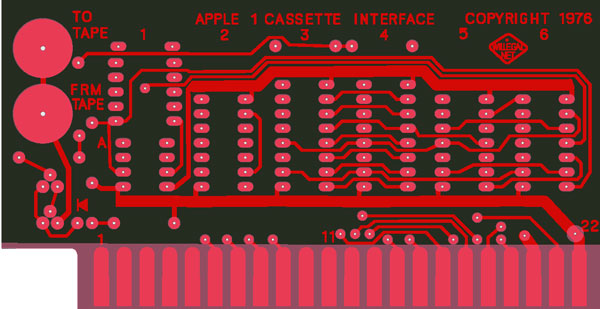
ACI build and operations manual online

I’ve put a preliminary copy of my ACI build and operations manual online at: http://www.willegal.net/appleii/aci-v0.12.pdf This contains an OCR’d copy (not just a scan) of the original Apple ACI manual, plus a complete assembled listing of the ACI PROM. Take a look and let me know if you see any problems.

Also – remember that this is the last month for discounted ACI presales – get the presale price of $75 through September ’10. Shipments begin late October or early November. Contact me via email at mike@willegal.net if you are interested in the ACI card.

Datanetics Keyboard Replica Progress

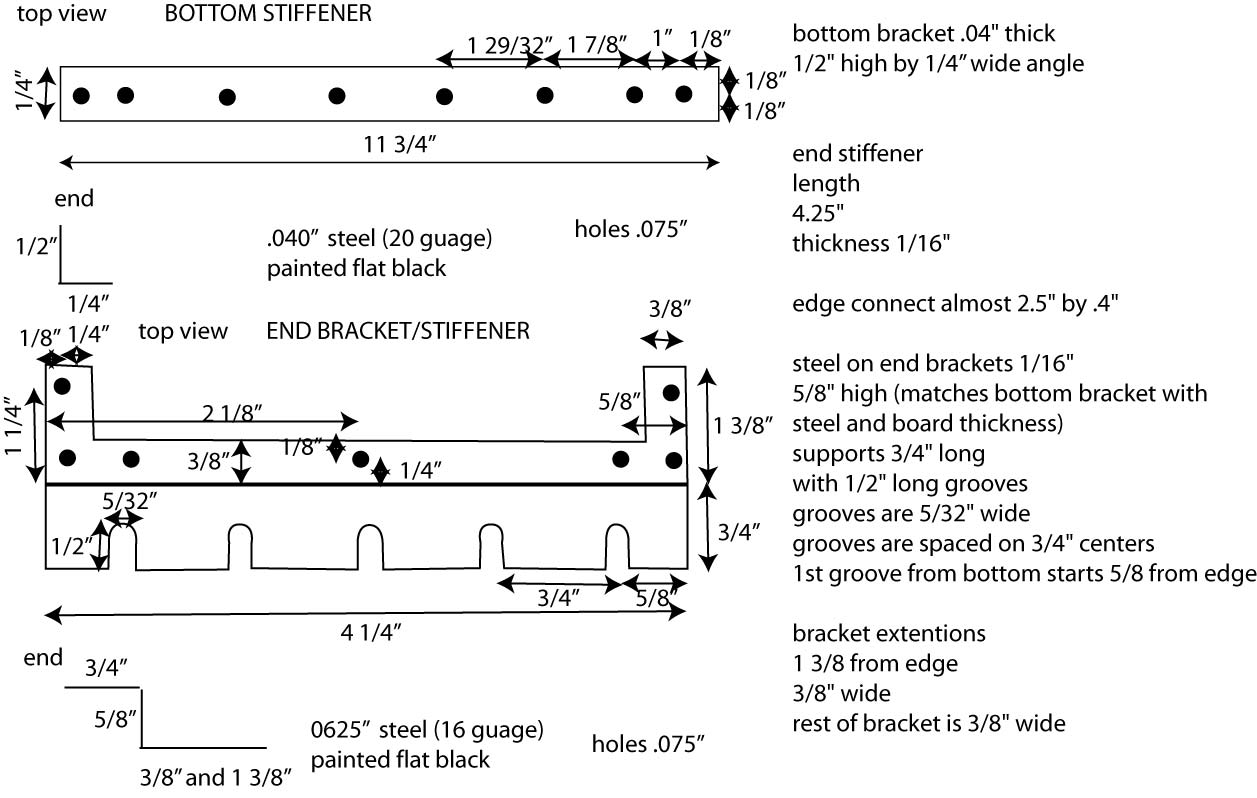
Still working on this one in my spare time. Just completed drawings (not to scale) for the brackets.

Datanetics Keyboard Stiffeners

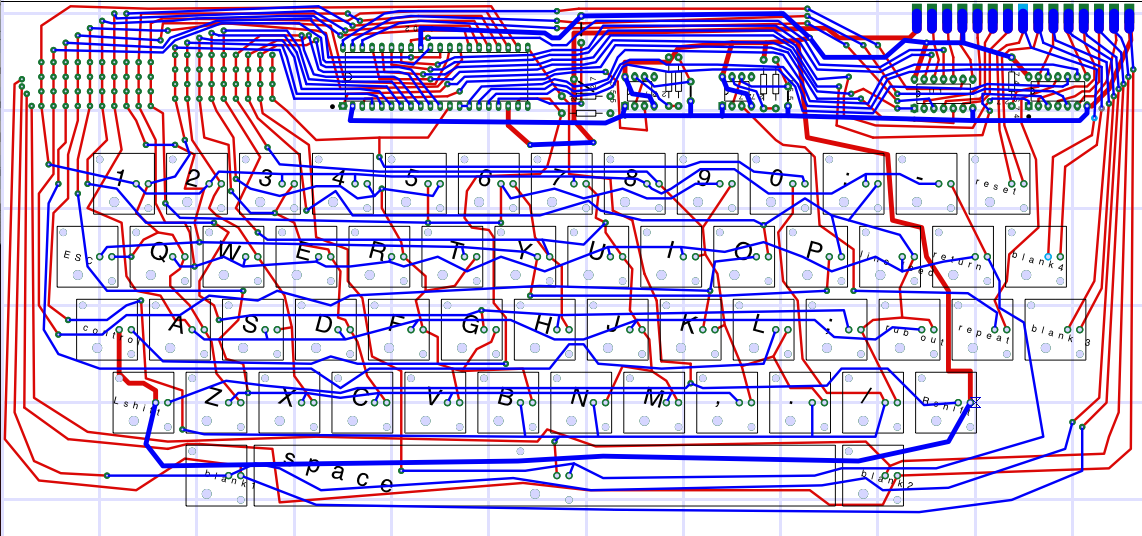
Layout is coming along also. I have smoothed out the traces on the top and am working on the bottom. Also spent a lot of time working on hole sizes. It is surprising how important this is to a good replica and how long it takes to measure the various holes in a PCB.

Apple command line to AIFF sound file converter

Hi,

I have just posted my latest hack. This is a small C program that will convert an Apple Command Line file to AIF format. This AIF format file can easily moved to an iPod and be used to load your Apple 1 through the Apple Cassette Interface.

The program and more information can be found here: http://www.willegal.net/appleii/apple1-software.htm

In case you are wondering, an example Apple command line format file might look like this:

0: A9 00 AA 20 EF FF E8 8A
: 4C 02 00

Now Taking Names for ACI Wait List

The Panasonic RQ2102 cassette recorder works about 100 times better than the period Radio Shack recorder that I was attempting to use. I recommend that all Apple 1 owners get one of these while they are still available.  Since it works pretty well, I’m go to go ahead and start the process for making a batch of ACI kits.

First,  I’ll take names for the wait list. Though the layout is done, I don’t want to invest the money until I build up a wait list of around 15 units. Send me an email (my address can found on my website) and I’ll put you on the wait list.  Once the wait list reaches 15 or so units, I’ll ask for money and then order boards and parts.  I expect the cost of the kits to be under $100.

I’ll publicly track the wait list with your initials, date I received your request, and number of kits desired on my ACI page.

Datanetics Keyboard Update

Current State of Datanetics Layout

I’ve got all connections made, except for the connections from the blank keys to the matrix on the upper left side of the keyboard. From here I may take a break and make a schematic, since I’m not aware of any in existence for this keyboard.

I still have holes to drill 🙂 and plenty of fine tuning to do. This layout will match a Rev B board. There is a mistake in the original layout of this board which requires a couple of of cuts and and a jumper. I will probably leave the mistake in place.

The pinout of the edge connector is:

Front (from inside of board moving toward edge when facing front of board, left to right)
-12V
B6 (B is data bit)
B5
B4
B1
B2
B3
Reset key pin 1
Reset key pin 2
Output enable (this is an input to the keyboard, but is pulled up on the board to +5 volts)
STROBE (output)
B7
B8
B9
GROUND

back side of keyboard (from edge of board moving inward when facing back of board) (Right to left)
blank keyswitch 2-2
blank keyswitch 2-1
blank keyswitch 1-2
blank keyswitch 1-1
blank keyswitch 3-2
blank keyswitch 3-1
blank keyswitch 4-2
blank keyswitch 4-1
unused
unused
unused
+5 Volts
unused
unused
unused

Now it’s time to go for a bike ride.

New Project

Folks,

Quick update – while waiting for the panasonic cassette recorder to arrive, I’ve started work on a new project.

This is going to be a Datanetics Keyboard PCB. This was the keyboard that was most commonly used with Apple 1 computers. There were several revisions made. I’m likely to layout the rev D, since it used most of the same keycap set as early Apple IIs. However, I have access to an actual, original rev B, and may decide that I can do a more faithful replication of that version.

Note that some of the important parts for this keyboard can be very hard to find. The MM5740/AAE keyboard encoder is a very difficult IC to find. Furthermore, the ones you do find, sometimes do not work reliably. Randomly repeating characters after warm up is the symptom of this problem. It would be possible to program a micro controller to accomplish the same function and mount it on a plug in daughter card. However, I think I have enough MM5740’s to satisfy my own needs, so I’ll leave that to someone else. As far as I know, Datanetics key switches and key caps can only be sourced from early Apple II plus computers. The early Apple II/plus keyboards used the same keyswitch and the same style key caps. In fact those keyboards were made for Apple by Datanetics. There are also some metals stiffeners that will be have to be fabricated in order to complete the project.

Because of the difficulty of finding parts, my plans are to only sell bare PCBs, leaving it up to the prospective keyboard builder to find the parts for his build. In addition, I will ask for pre-payment and only order enough PCBs to fill pre-paid orders. I’ll be accepting pre-orders when I feel that the layout is ready for production. The order will be placed when I have enough pre-orders to justify making a build.

Apple Cassette Interface (ACI) update

I’m still working on the ACI layout, but I have some more things to do.

I want to make sure that I can make operation more reliable before I make a batch of cards for consumption by hobbyists. Besides the capacitor change, I want to find a cassette recorder that works better than the vintage Radio Shack model that I’ve been using. Even with the capacitor change, operation is not the most reliable in the world with this recorder. The recorder I’m waiting to try is the Apple specified cassette tecorder. This is a Panasonic RQ-2102, which much to my surprise is still in production. This recorder was recommended and used by Apple back in the 1970s. I have a new one on order, but it’s on back order and not due to arrive for several more weeks. Used ones are often available on eBay, but I’m looking for a new one, since belts on cassette recorders tend to stretch and slip with age.

The ACI layout is largely complete, with only rounding off of the corners of the traces and final design checks remaining to be done. Though I did the initial layout in a couple of hours, I’ve spent a lot more time than I expected fine tuning the replication of the details of the original. I think that because the board is small, finer fidelity to the original is required to ensure that I capture the right look and feel on this board

New Apple 2 Rev 0 Revelations

I did a comparison of the hidden traces on my rev 0 replica with the fantastic image of the front bare Apple II rev 0 PCB, that I just received from Stanford University. I found that all of these “hidden” routes were precisely the same as the actual rev 0, except for two.

  • First was a trace I connected, that didn’t exist on the rev 0, but was later added on the rev 1. This is the pull up on pin 12 of the 74LS74 at B-10.

    missing pullup on rev 0

    The image on the left, is the original. Note that this missing trace is actually an undocumented bug in the rev 0. The trace connects the D input of a flip flop with a pull up. Without the D input to the flip flop being pulled up, it is left in a “floating state”, That means that when a clock edge is seen on the flip flop, that either a positive or negative level will be clocked in, depending on exactly where the input is floating at. Usually this will be a positive level, since 74LS input logic tends to float high, but it’s far from guaranteed. This flip-flop is used to indicate to the computer when a character is pressed on the keyboard. This floating input could cause the computer to miss keystrokes. I don’t remember this being a problem on my original rev 0, but the possibility is there.

    When laying out the replica PCB, I ended up cutting up a socket on a later rev board in order to determine the route of this trace, not realizing that it wasn’t even present on the rev 0. The poor photocopy in the “RED BOOK” occasionally wasn’t good enough for me to solve a puzzle, and I had to resort to this sort of tactic, from time to time. In this case it failed me. Looking at the image now clearly shows that the trace wasn’t present, but there are other places on the photocopy where present traces are barely visible. For some reason traces that ran vertically often show up poorly in this photocopy.

    74LS74 photocopy area

    It you have one of my replica’s and want to experience authentic behavior, lift pin 12 of the flip-flop out of the socket (or you can bend it under so the change doesn’t look obvious). You probably will not notice any difference in behavior. You could also cut the trace, but I would recommend that you leave well enough alone and run it as is, with the input properly pulled up.

  • The second difference is also interesting. This difference resolves a misconception I had about the implementation of the fabled USER1 bus line on the Apple expansion slots. The USER1 jumper is documented incorrectly in the Apple II reference manual. The vias that need to be connected to enable USER1 are partly obscured by the ear of the Slot 7 connector, so adding this jumper, would have to be done from the back of the board. In Apple’s “Hobby/Prototyping Board” document it says “The function of this line will be described in a later document.” USER1 must not have been used by any I/O cards since it was reused on the IIe as 65C02 sync and changed again on the IIGS to M2 SEL.

    The routing of trace in question is partly hidden by the ear of the slot 7 connector. I connected pin 39 of the peripheral bus, USER1, from the peripheral bus to the wrong via. This via directly connects to the enable on H12. USER1 should have connected to another via, that is not connected to anything else. The user was supposed to add a jumper between two vias to make this connection.

    If you have one of my rev 0 replica’s I would do nothing. I have heard of no issues of peripheral card compatibility from replica builders over the years. You are more likely to have peripheral card problems because of the other changes that were introduced to the bus than with USER1 being connected to the enable of the decoder at H12.

    There is a very minute possibility that you may have an issue with an unusual peripheral card that uses USER1 in an unexpected fashion. In this case, you can disconnect USER1 by carefully cutting the trace on the back of the PCB that leads from pin 39 (USER1) of the peripheral bus to the via that takes to the trace to the front of the board. Instead you could try cutting the trace where it connects to the via near the edge of the slot 7 connector. This will be more difficult because the ear of the connector partly obscures the via.