Apple Monitor Format to AIFF Utility

September 21st, 2012

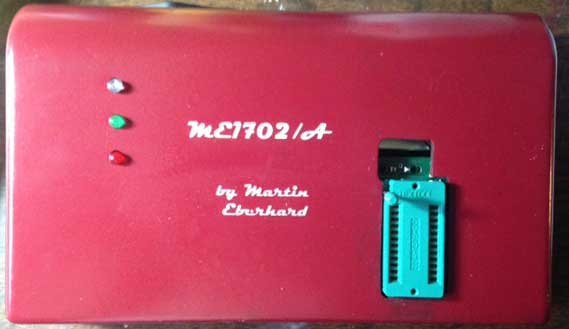
I use this utility to convert files in Apple monitor format files to AIFF. Once in AIFF format I can download them to a real Apple II using a portable music player (iPod) and the cassette port on a real Apple II. This is the easiest and fastest way I know of, to move files to real Apple II and is an essential part of the cross development process I use for developing Apple II programs.

This version has only been tested on Intel MAC, but it was converted from a Mac PPC program, fixing endian and word length issues, so it may work, as is, on other platforms. I have a similar version for Apple 1, but it hasn’t yet been converted to Intel Mac. Here is the source for the Apple2 monitor to AIFF program.

a2aiff

SCELBI Museum Website Up

September 20th, 2012

Cameron Cooper has put his SCELBI website online. It contains a ton of SCELBI information, some of which cannot be found anywhere else on the web. Check it out: www.scelbi.com

New Version of PS/2 Keyboard Adapter Firmware

September 16th, 2012

I had to program a new batch of micro-controllers, so I decided to make a few minor tweaks to the firmware.

  • The data invert functionality has been dropped . If you need inverted data, you can use external inverters to accomplish the same functionality. I don’t know of anyone that actually used this feature.
  • The jumper that used to control inverted data, is now used to control automatic reset and clear. Automatic reset system and clear screen upon power up is now disabled, unless the jumper is inserted. Several Apple 1 owners wanted more authentic operation, so now I disable automatic reset and clear screen feature by default.
  • A behavior that sometimes caused multiple resets when control-alt-delete reset sequence was used has been eliminated. Once reset occurs, all three keys must be released, before control-alt-delete can cause a second reset. The control-r, control-s, control-t reset functionality is unchanged.
  • Check out the manual that is downloadable from the PS/2 keyboard adapter page.

    new batch of Mimeo’s on order

    September 15th, 2012

    Next batch of Mimeo boards are now on order. I should be able to pick them up in about 3 weeks. Sorry for the delay, to those that I promised boards in September, but a lot has been going on here at Mimeo headquarters.

    This order was delayed, because a couple of weeks ago, I decided to investigate the possibility of using a different supplier, that would be able to work with me a little bit more. Though Advanced Circuits does fantastic work, they are set up to produce boards in a standard way. Whenever I have asked for them to do something a little different, I really haven’t received much help, or have been asked to pay for custom service, which is often more than I can afford.

    An example is the Datanetics keyboard PCBs that I had made a couple of years ago. Even though those boards have no solder mask or silkscreen layer, I had to pay standard price. Other “online” PCB fab places have similar policies.

    Yesterday, I visited a local place that I placed the order with. They took about an hour to talk to me. They even took me on a complete tour of their facility. I was pretty impressed at the complexity of the process. Anyone familiar with etching PCBs at home, would hardly recognize what is going on in a real production facility. I know I hardly did.

    Pricing was competitive. I’m taking a slight hit on a one time set up charge, but I think the personal service will be worth this one time cost.

    Stay tuned for an update as we proceed through these uncharted waters.

    Scelbi Museum Website Will Be Online Soon

    September 15th, 2012

    Cameron and I (well mostly Cameron) has been accumulating SCELBI docs, software, flyers, images, books and information. Cameron is working on putting this online, so soon we will have a comprehensive SCELBI site available for everyone to enjoy.

    Early SCELBI Price List

    September 14th, 2012

    Check out this early SCELBI price list that I managed to obtain. Notice the address is Nat Wadsworth’s residence.

    SCELBI Price Guide

    Rod Holt’s Apple 2 Fix (part 2)

    September 14th, 2012

    Well I found some time and pulled the DRAM bus termination resistors from one of my rev 0 replicas, to see what would happen. I expected to find the machine still worked but with some erratic behavior. I planned to take before and after O’scope shots of the DRAM address bus to be able to demonstrate the difference.

    What I expected and what I got were quite different. What I got, was a machine that wouldn’t boot and give me a monitor prompt at all. I couldn’t really do before and after O’scope images, because I couldn’t generate an apples to apples comparison without putting the processor into the same tight loop for both test cases. However the display on the video was stable, so it shows that DRAM access was at least mostly working without the termination resistors.

    I tried 4K and 36K DRAM configurations, and found no difference in behavior.

    While my reproduction isn’t an original Apple preproduction board, I don’t think behavior would have been significantly different on a preproduction Apple II.

    Just to speculate a little. There may have been enough board to board variation that some pre-production units worked better than others, but I imagine that on the whole, things didn’t look very promising when the first prototype Apple IIs were built. Imagine the struggle that the early Apple employees had, finding a way to stabilize the computer enough to show at the West Coast Computer Faire, and more importantly get it in shape for revenue shipments.

    The old mac is dead, long live the mac

    September 11th, 2012

    It was actually a 2002 model, 1.25 GHZ dual processor MDD tower. I loved that machine, it really only started showing it’s age in the last couple of years. That machine lasted longer as my main home machine than any other I’ve had. Other contenders:

  • The next was a IIci which lasted about 7 to 8 years. The IIci was also my most expensive computer purchase – about $5000 including grayscale monitor and video card.
  • My MAC 128K lasted about 6 years (including a number of upgrades up to MAC plus)
  • I wonder if Apple will be releasing new Imac models tomorrow?

    old (but not vintage) mac woes

    September 9th, 2012

    My 8 year old Mac G4 crashed last night and refused to reboot. Took all normally recovery measures (resetting PRAM, etc) and still no go. Took every removable component off and still no go. Power supply measured correct voltages. Was suspicious of motherboard/CPU. re-seated everything else that I could get at (including CPU daughter card). Still no go.

    At this point, I was considering next steps – what computer to replace it with and how to move contents of hard drives forward, when I discovered an obscure way to reset open-firmware (which handles booting the machine) on Apples web site. It did the trick and I’m back in business. I’m a bit surprised that I didn’t break anything, giving all the fiddling that I did.

    Now to figure out what I was doing, when it crashed…

    Rod Holt’s Apple II fix

    September 7th, 2012

    There are stories floating around, about how early prototypes of the Apple II were not very reliable and Rod Holt made some fixes to make the design more reliable. A recent example is this Mike Scott interview.

    Just what exactly was wrong and how it was fixed is not mentioned in any of these stories. I’ve always had my suspicions about what one of the problems was. However, without confirmation, I’ve been reluctant to speculate publicly in my blog or elsewhere. Last spring at VCF east, I had a chance to chat with Dan Kottke. Dan was very involved at the technical level with both the Apple 1 and Apple II. More importantly, he seems to have retained in his memory a great many details about those early days at Apple. Dan confirmed my suspicions about what one the of problems was.

    Since I first heard the story of the flakey Apple II prototypes, I was very suspicious of the two SIP resistor modules shoehorned at the end of two of the three rows of ram. Here is an crop of an image of Geoff Harrision’s rev 0 board, #97 showing two blue SIP packages.

    SIP Modules Shoehorned in between chips

    SIP Modules Shoehorned in between chips


    (thanks to Geoff for permission to use this image)

    These resistors are used to terminate the DRAM address bus. Termination is often added to a bus to improve signal quality in cases where noise and ringing cause performance issues. That was the first clue, but there are others. Nowhere else on the board are parts jammed so close together with so little spacing between traces. Also note the silk screen set at an angle – no other parts on the Apple II are labelled that way.

    This image of the copper layer on my rev 0 replica shows how tight this area of the layout is.

    Copper layer around SIPs

    Copper layer around SIPs

    Dan confirmed for me that these SIP packages were added after prototypes exhibited problems with a DRAM address bus that was, in Dan’s words, “all over the place”.

    Satisfied that I have found and had confirmed at least one of the problems with the preproduction Apple IIs, I still have two questions left to answer.

  • Just how bad is “all over the place? Just how well will a system without these resistors run?”
  • Are any preproduction Apple IIs without these SIP packages in existance?
  • Well, I think I have the means to get some idea of the answer to the first question. I will be doing some experiments in the future and reporting results in this blog.

    The answer to the second question will only be answered if someone comes forth with a pre-production Apple II, without the termination resistors. Knowing how engineers save prototype hardware, I’m thinking that some early Apple employee will come up with one, at some point in time. Who knows, maybe Rod still has the one in which he grafted the resistors onto, in order to test his fix.