SCELBI Chassis Build Tips

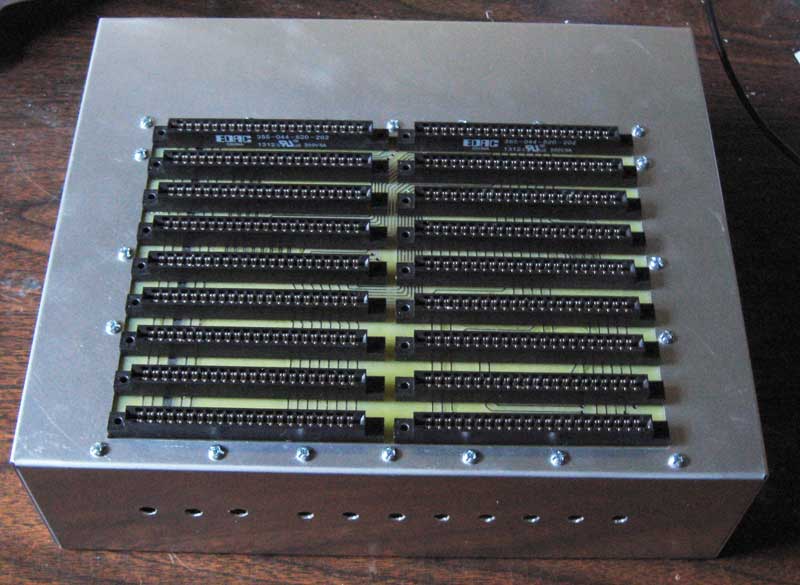
I’ve been working on moving my SCELBI 8B to one of Corey’s custom chassis. Here is what it looks like at the moment.

8B Chassis

8B Chassis

I figured I’d share some SCELBI chassis preparation tips here.

    1) To prevent rub marks, use masking tape to protect any areas of the sheet metal that may experience contact with your tools.

    2) Keep in mind that during this period, American engineers exclusively used imperial dimensions.

    2) If you are converting a BUD AC-413 chassis you must first cut out the backplane area and drill holes for the I/O ports. If you have one of Corey’s chassis you can skip to step 6.

    3) I recommend, making patterns for both top backplane opening and rear I/O connectors. Then attaching the patterns to the chassis when making the cuts.

    4) The hole in the top for the backplane is set back 1/2″ from the front and centered from side to side. The dimensions Corey used for top cutout of the 8B is 6.375″ deep by 8.875″ wide. The 8H is 1 slot shorter in depth. Slots are spaced by .75″, so 8H would have .75″ less depth. 6.375-.75 = 5.625 There isn’t a lot of room for error when mounting the backplane, so try to be precise as possible. If done right, the edge connectors will just fit through the opening, when the backplane is mounted underneath. If you have doubts, you can add the edge connectors to the backplane and measure the area needed to fit them and work from there.

    5) The I/O holes in the rear can be punched out with a type 732 GreenLee chassis punch, sized 1 11/64″. Be aware that type 732 comes in different sizes. Prior to punching you need to make a series of 1/2″ holes to mark the center of each opening. These holes are on 1 3/8″ centers. There is more on these dimensions on this blog posting.

    6) Once you have pilot holes for the I/O connector and the backplane opening cut out, you can punch out the final I/O connector holes. When using the punch, the cutting edge should be on the outside of the chassis, so you don’t mar the exterior surface. Don’t mount the I/O connectors until all cutting on the chassis complete. I don’t know if it makes a difference, but I lubricate my Greenlee cutter with spray silicone lube.

    7) If you have a front panel, you can use it as a guide for the toggle and push button switch holes. Simply clamp it to the front of the chassis. There should be even overhang on the sides and the bottom of the chassis should be flush with the bottom of the front panel. The holes for the toggle switches are 1/4″ and the push buttons are 9/32″

    8) Mounting the backplane is one of the most critical aspects of building a SCELBI chassis. Solder on all your edge connectors before proceeding, but do not mount the card supports.

    9) Note that the current version of my 8H backplane does not have predrilled mounting holes, so you will have to drill holes through both the backplane and chassis together, instead of using the backplane as a guide.

    10) In order to drill the backplane mounting holes, position the backplane on the underside of the chassis. The edge connectors should protrude through to the top of the chassis. I use card stock to shim each side of the backplane so it is centered and doesn’t move. I use #6 screws to mount my chassis, so I used a 9/64″ drill bit. Don’t confuse the holes for the card supports with the chassis attachment holes. For the 8B, I start by using the backplane as a guide to drill 4 holes in the chassis. These holes are the ones on each back corner, and the ones on each side closest to the front.

    11) I then move the backplane to the top of the chassis and use the holes I just drilled to correctly locate the backplane. Put 4 screws through the 4 holes you just drilled to keep it in position. If you have an 8B, you can use the backplane as a guide to drill out the remainder of the chassis support holes.

    12) Note that the support of the front edge of the backplane is not by holes through the backplane, but by the nuts of 7 supporting screws which overlap the front edge of the backplane. These 7 holes must be located at the edge of the backplane, so that one edge of nuts will hold the backplane in place.

    13) Any burrs left on the holes can be scrapped off by twisting a sharp, large bit in the center of the hole. Do this by hand, not in a power drill. The aluminum is soft and it doesn’t take much to remove these burrs.

    14) Remove the backplane before you add the Amphenol I/O and power connectors. The rings that hold these on, do not seat completely and it is an exercise in frustration to try to make it so.

    15) Now that all the holes are drilled, mounting the backplane to the bottom of the chassis is pretty straight forward. Just don’t over-tighten the nuts or you could crush the substrate.

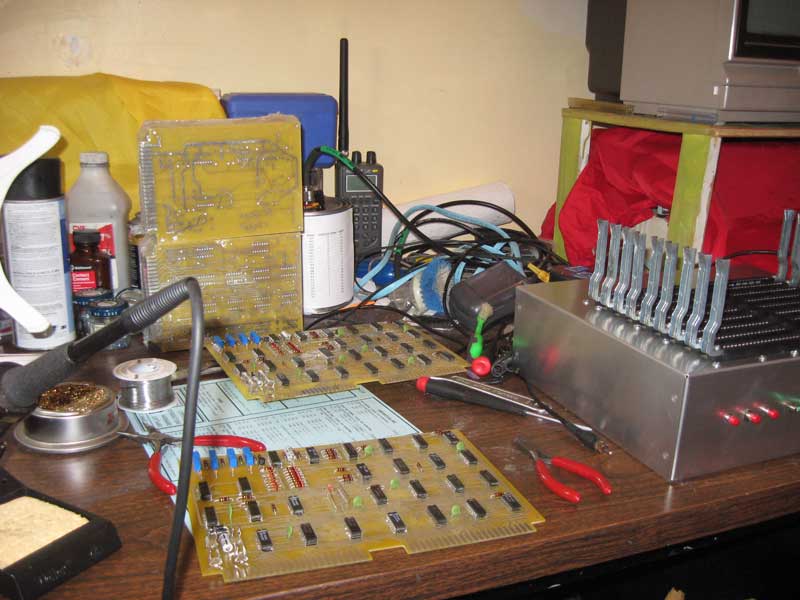
SCELBI Cassette Read and Write Cards Ordered!

It should take a little less than two weeks for them to arrive. During that time I’ll continue work on moving my 8B system from a temporary chassis to one of Corey’s custom chassis.

I started on the read card in December, so these two cards took about 7 months to do. I guess I might be slowing down a little bit. On the other hand, I’ve had a lot of other things in progress at the same time.

Assumming that these two boards work out, this leaves only the keyboard and the 2 oscilloscope cards left to do to complete the entire SCELBI board set. The keyboard and scope analog cards should go pretty fast, but the scope digital card is a fairly complex double wide card, so it will probably take a while.

Apple 1 Registry Updated – One of Which May be Myth Destroying

This update is way past due, I had knowledge of some of the new units since last fall. Three new Apple 1’s are listed. The most interesting is number 1-0052,owned by James Coble. His story seems to shatter the myth that the Byte Shop, not Apple, added the serial numbers on the units in the first batch. There were some issues with that story before, but this information seems to completely shatter it. I have a sent a query out to some experts to see if they can comment on what James has to say. Stay tuned for an update.

Another interesting note is that the unit that was sold on ebay is reported to be going to Germany. The world-wide market for Apple 1 continues to be stronger than the domestic US market. I think the Ford Museum purchase might have been an anomaly.

Lastly, I’m pretty skeptical about the report from the bay area about an Apple 1 being given to a recycler. That unit is not going to get mention in the registry until far more concrete details (like a picture) are revealed.

Old School Engineering

I just viewed Dave Jone’s latest video blog about the Sony Walkman. For some reason, I decided to download the service manual and have a look. One thing that I immediately noticed, was the lettering on the schematic appears to be another example of Leroy Lettering.

This caused me to reflect a little bit about my first year or two of college and my first job in industry. Before discovering computer science, I started out in a mechanical engineering program. The first engineering oriented courses you took, were drafting courses. I had no trouble with perspective and different technical aspects of drawing. However, I really had trouble creating drawings that looked nice, clean and sharp. There was no mention of Leroy or any other mechanical lettering system, so we had to hand letter our work. To this day, I don’t have the hand of an artist, and I think that lack of natural artistic ability held me back in that program. The skill of an artist, developed or natural is something that is apparent in a well done engineering drawing or schematic.

In years gone by, many engineers would spend their workday at a drafting board. I started my first co-op engineering job, in the late 70’s. That first company that I worked for, still had a drafting department for creating PCB layouts, as well as an art department that did the artwork for manuals as well as marketing material. The “uniform” of many of the experienced engineers was a white shirt, dark pants, a dark tie and a pocket protector. Second level managers omitted the pocket protector and added a sport coat. It’s basically the look of the NASA mission control team for the Apollo program.

A few years later, in the early 80s, I remember going for a job interview at IBM’s small system division. That was the first home of the IBM PC which was located in Boca Raton, Florida. Almost all the engineers there still wore that “uniform”. I did see one guy wearing a colorful shirt and jeans. He stuck out like a sore thumb. The IBM employee that was with me at that moment, pointed him out, and said he didn’t really fit in to the culture.

How times have changed.

8B Assembly Manual Mistake Discovered, the hard way

I’ve started working on building up a second set of the “core” SCELBI boards. I call the boards that are shared between the SCELBI 8B and 8H, the “core” boards. These are the front panel, the cpu, the DBB, and the input boards. When I built my prototype 8B, I didn’t bother to make new “core” boards, I just borrowed them from my 8H. Now that I have a new set of the “core” PCBs in stock, I figured that I would make up a second set, so that I could run both the 8H and 8B at the same time.

As part of the building of these new boards, I figured I’d use the 8B manual that I am in the process of digitizing. Yesterday, after completing the front panel board, I discoved that all my LEDs were installed backwards. The manual states:

The anode of the L.E.D. (shorter lead) goes in the top most hole (furthest away from the card connector). The cathode of the L.E.D. (longer lead) goes in the bottom hole.

This is actually the reverse of how LEDs are made – the cathode has the shorter lead, not the anode. I didn’t encounter this issue when building the board for my 8H, because the 8H front panel instructions were written for the old style LEDs in the cans, so I had to figure out the right way to connect them without benefit of the SCELBI manual. You would think that with all the projects that I’ve done, that I would remember how LED’s are constructed and connected. However pinouts are the sorts of details that are easily found in reference material, so I don’t put any effort into memorizing pinouts of anything.

As far as the newly digitized manual goes, one of my intentions is to add content and clarification when it is missing, but maintain the “character” of the original manual. I think, in this case, I will correct the text and add a footnote that explains how the original manual was wrong.

Cassette Write Board Verification in Progress

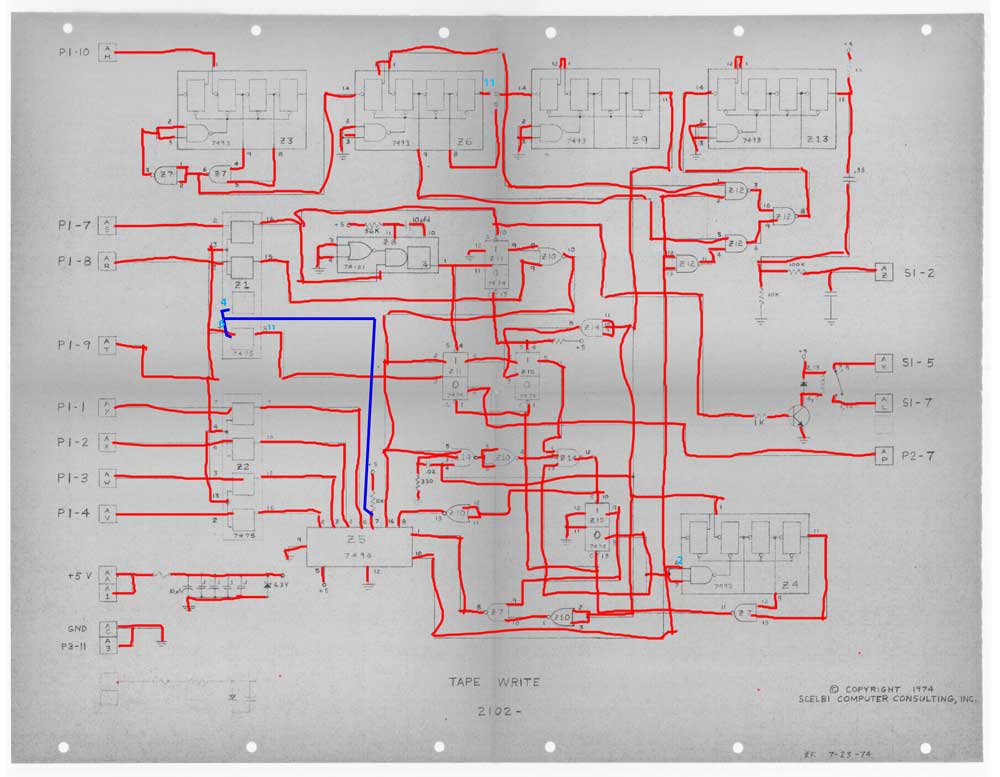
Verifing the layout against schematics, is an important step in my reproduction process. My usual method of schematic/layout verification is to print a copy of the schematics then mark each trace as I verify the connection with a marker. This time I did it all digitally using photoshop as a replacement for the paper.

Tape Write Schematic Markup

Tape Write Schematic Markup

The blue layer notes omissions, corrections or clarifications to the schematics. Most of these are due to the mistakes made in the initial rev of the board, which were later corrected. The version of the schematics I have access to, does not have those changes incorporated into them.

During this process, I did find a number of traces that were hidden under chips. Omitting these traces is an easy mistake to make. I missed one of these on the memory expansion board. This time, I am reasonably sure that I found them all.

Civil War Controversy: The Relieving of General Warren Before Five Forks

A while back, I created a web page with some of my views on controversial topics of American Civil War history. The first topic talks about my view of the efficiency of Army of Potomac Corps commanders in both 1864 and 1865. One of the most controversial changes was on April 1, 1865, when General Phil Sheridan relieved General Warren of command of the V corps. To this day, the correctness of this decision is debated by civil war buffs.

The website http://www.beyondthecrater.com has a number blog entries covering both sides of the controversy. What is especially interesting is reading the blog entry covering messages between various Union generals on May 30th and April 1st.

My view is that Generals Grant, Meade and Sheridan had every right to relieve Warren. In my view, Grant didn’t trust Warren to do the right thing in a crisis. The messages captured in the Official Records clearly indicate that Generals Grant and Meade were attempting to micro-manage Warren’s actions. If Grant had confidence in Warren, I believe that he would have given Warren general directions to work with Sheridan in order to turn the Confederate left and cut the South Side Railroad. A commanders lack of confidence in a subordinate should be enough to justify removing a person from such an important role.

Whether Warren was a competent corp commander or not, really is quite a different discussion. Even if he was actually the best corps commander in the world, if he didn’t have the confidence of his boss, relieving him of command, was the right thing to do. No commander should be saddled with a subordinate that he can’t trust in a crisis.

Web Page Unique Visitors

I’ve been using the same hosting service since 2009 and just went back and collected yearly stats for “unique visitors”.

Web Page Unique Visitors

Web Page Unique Visitors

The data for 2009 was only for 11 months so I multiplied by 12/11. The data for 2015 is for 5 months so I multiplied by 12/5.

The overall trend is for a general increase in activity, but this year could be slightly down over the past couple. However one real popular blog posting could affect the yearly results in a big way. November of 2014 had a major temporary increase in hits with my report of Steve Wozniak still thinking about improving the Apple II design generating over 26,000 visits for that month alone.

The total number of “unique visitors” over the last 6+ years is 537,704.

Dr. Galfo’s Integer BASIC Compiler

I just put up a web page with documentation and DSK images of Dr Galfo’s Integer BASIC Compiler (IBC). This compiler was used in development of some well known Apple II games. It runs around six times faster than WOZ’s BASIC interpreter, so it’s worth trying out. Compiling an Integer BASIC program is easy. You simply load the program in the standard Apple interpreter and then run the compiler. You will be prompted for a few options and then, after the compiler is run, are given the option of running the program.

New Version of SCELBI OS/X Emulator Released

The release of a new version of my OS/X SCELBI/8008 emulator was motivated to provide support of the Modified Creed Monitor for the 8008. To do this, I added menu options to support to optionally setting (input) and clearing (output) the most significant bit of input and output serial data. For the MCMON, the input menu for set the bit should NOT be set. The output setting doesn’t matter.