Wozanium Pack Source Code and Rom File Suitable for A2 Emulators Released

Ken Gagne was kind enough to take some Brain Boards out to K-fest and sold them at the vendor fair. Do to these extra K-Fest sales, I’ve now managed to cover my costs in producing the “Brain Board”. Thanks to everyone that has purchased one (or more) of these units.

Because I’ve covered my cost, and it might be interesting to some folks, I’m now releasing the source code for the Wozanium pack.

Also included, is a ROM file suitable for emulators, such as Virtual II. This allows you to run and debug Apple 1 software in the Apple II emulator environment. Just select the .ROM file as the ROM for your machine and reset your virtual machine. Just as in the Brain Board, right arrow will clear the screen. With Virtual II, you can download AIF files of A1 basic and assembly language programs and run them in your emulated Apple II, using the emulated cassette interface built into Virtual II. Note that this ROM version does not include the ACI driver at C100, so you must enter the Cassette driver by entering “D000R”, instead.

You can build the source with the 6502 DASM cross assembler.
Use the following command line:
“dasm a2a1emulv5_1.asm -DBLD4ROMBD=0 -DHUSTNBASIC=0 -oa2a1rbh.o -la2a1rbh.lst”

Included in this zip is

* a1basic-universal.asm – Apple 1 BASIC modified to run on Brainboard/Wozanium (note copyright at beginning of this file)
* COPYING.txt – GNU lincense for rest of Wozanium pack
* a2a1emulv5_1.asm – Wozanium source code
* a2a1emulv5_1.lst – Listing
* a2a1emulv5_1.o – Object file
* a2a1emulv5_1.rom – 12K rom file that can be used with A2 emulators, such as Virtual II.

Click a2a1emulv5_1.zip to download Version 5.1.

More about the Brain Board can be found at:
http://www.willegal.net/appleii/brainboard.htm

A 6800 based Apple-1 in the future?

Looks like Eric of http://whats.all.this.brouhaha.com/ is working on a 6800 Monitor for the Apple 1. Several people have talked to me about doing this in the past, but it looks like Eric is really doing it as part of the annual retro-challenge. The obvious question is whether Eric or someone else will configure a physical clone of an Apple 1 for a 6800 and see if the hardware really works as designed.

Whacky 8008/Scelbi Emulator Project

Before I actually build a pilot batch of the Hobby cards that I have been designing, I need some pilot projects to try it out with.

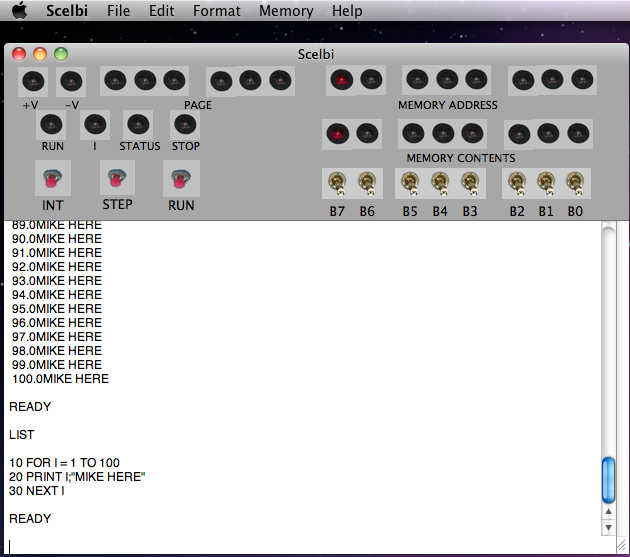
One of these projects is kind of off the wall. I’m working on an 8008/Scelbi emulator that runs in a Unix type shell. Eventually I’ll port this to the 6502 and be able to run it on the Apple II. The 1MHZ 6502 in the Apple II is well over 5 times faster than an 500KHZ 8008, so this isn’t as crazy as it first seems.

Eventually a brain board version seems like it would make sense. In order to get the full Scelbi effect, I’ll also need to build a replica Scelbi front panel. This is where the hobby board comes in – as the hobby board becomes the interface to the replica Scelbi front panel from the Apple II runing the Scelbi emulator in the brain board. wow -I’ll be surprised if anyone made sense of that last statement when they first read it.

If you don’t know what a Scelbi is, check out the wikipedia entry.

Apple 1, noise on -5 volt supply

I’ve noticed long ago that there is a significant amount of noise on the -5 volt supply on the Apple 1. The -5 power supply is connected to 16 4096 DRAMs, 7 2504v shift registers, and the 2513 character generator, 24 chips in all, spread around the board. Beside a 22UF cap next to the voltage regulator, there is only 1 .1UF decoupling cap connected to this supply.

Apple 1 - minus five noise

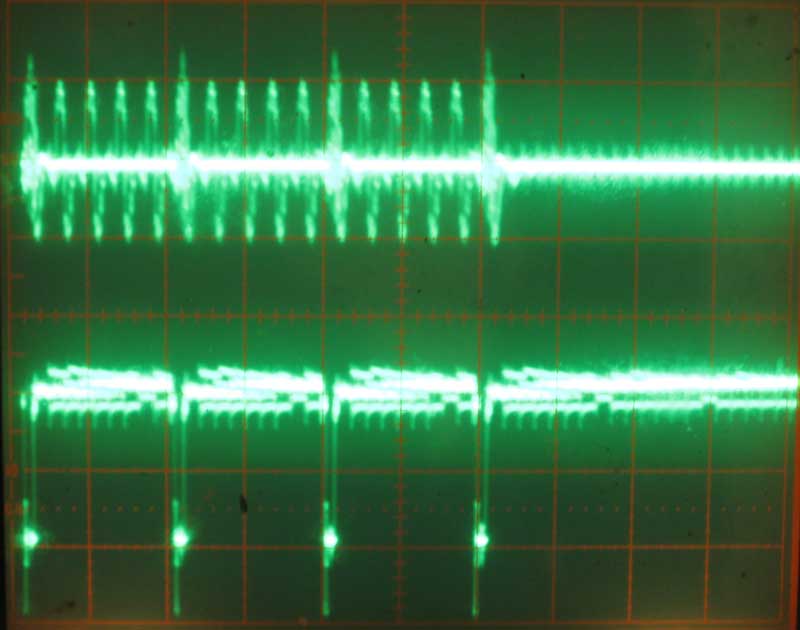
Here is an oscilloscope picture of this noise. Frequency of this trace is set to 5 micro-seconds/division. Top trace is -5 taken directly from a DRAM chip. Scale is .5 volts per division. Bottom trace is RAS taken from same DRAM chip. Scale is 2 volts per division. You can see that some of the noise on the -5 supply is being generated directly by RAS switching. This working system exhibits over a .5 volts of noise on the -5 supply to the DRAM chips.

Last month, while bringing up a new Mimeo 1 board, this excess noise on the -5 volt supply became a problem. This board exhibited intermittent memory write failures, with writes of zero bits occasionally failing. The bit would end up reading back as a one sometime later in time. It took me quite a few hours of debugging to figure out that the problem was due to all the noise on the -5 volt supply. The fix turned out to be a simple replacement of the single .1 UF decoupling cap on the -5 supply with a different .1 UF cap.

For those of you that don’t know, decoupling capacitors are typically distributed around boards that have digital circuits to limit surges in power demand from one chip from affecting the power supply to other components. The capacitors act as small power sources that can supply small amounts of power to nearby chips as the power demand from these chip changes due to switching logic levels. A commonly used ratio of decoupling caps to chips on a typical +5 volt TTL design is 1 decoupling cap to 2 74LSXX parts. I’m not sure what the ratio should be for -5 volt supply in a MOS design, but the Apple 1 implementation is clearly insufficient and results in a lot of switching noise on the -5 power supply.

Capacitors are rated for deviation from the specified value. Typical variations for the ceramic disc capacitors used in first batch Apple 1s are +80/-20. In order to optimize putting a higher value capacitor in this location, I built a simple capacitor tester. Future Mimeo kits will have a separately packaged .1UF ceramic disc capacitor that tested as having a value towards the higher end of the range seen. I recommend using this cap at location B13, which is the -5 decoupling capacitor.

Which Apple Interpreted Basic is the Fastest?

While at the vintage computer festival, I had an Apple 1, an Apple II with integer BASIC and an Apple IIplus with Applesoft all up and running.

At one point late in the afternoon on Sunday, I decided to have a simple performance contest between these machines. This is the program.

10 FOR I = 0 TO 10000
20 NEXT I
30 PRINT “DONE”
40 END

Two machines were matched against each other and the program started at the same time on both machines. The first to finish was the winner.

After several heats, here are the results.

1st place – Apple 1 – by a little
2nd place- Apple II
3rd place – Apple II plus – way behind

At first, I was confused by the Apple 1 beating the Apple II, as the Apple II should run about 5% faster than an Apple 1. This is do to the more efficient method for refreshing memory on the Apple II. The Apple 1 stops processor clocks while refreshing, while the Apple II uses unused portions of the 6502 bus cycles to refresh memory (and read video display data). Integer BASIC on the Apple II is a direct development of Apple 1 Basic, so I was thinking that the performance would depend on the processor, not the Integer BASIC implementation, which were basically the same.

After a while I realized that Apple 1 BASIC might be a little simpler than Apple II BASIC and thus faster. I ran a second test. In this test, I booted the A2plus that I had there at the show into Apple 1 mode, with the Brain Board/WOZANIUM and ran the test against the original Apple 1. Both machines were now running virtually the same version of BASIC. In this case, the Apple II beat the Apple 1 by the expected amount. Thus, Apple 1 BASIC running on an Apple II, is the fastest version of Apple BASIC.

However, keep in mind that if print statements are added to the loop, the Apple II will beat the Apple 1 by a substantial amount.

VCF – great time for a vintage computer nut

Last weekend was VCF east 7.0. I spent the weekend among other vintage computer nuts. It was a great time, and I highly recommend going out of your way to spend the weekend, next time this event is held. This event can not be fully appreciated unless you take the time to listen to the lectures, and see the museums that comprise the info-age facility.

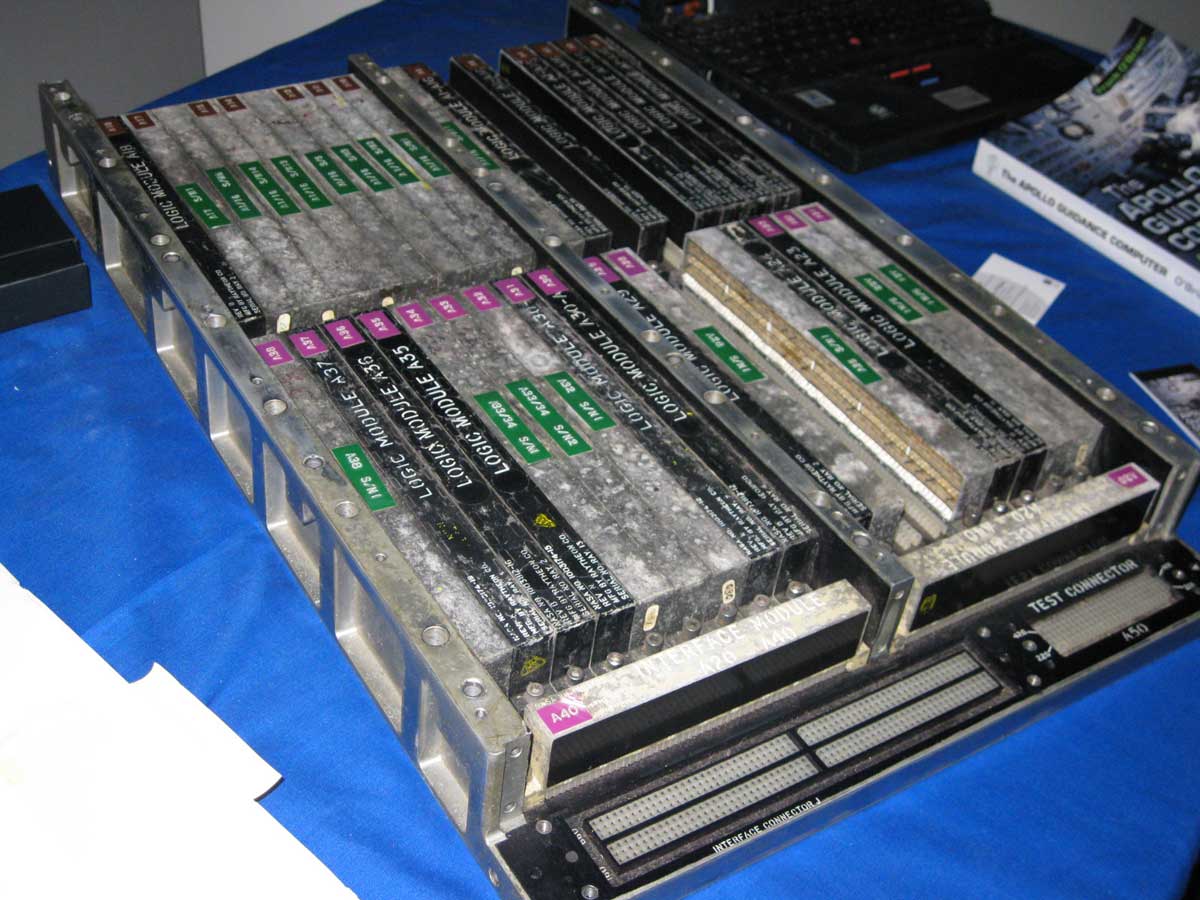
Among the highlights was seeing part of an Apollo Guidance Computer, something I studied last year. I was thinking of doing some kind of recreation at one point.

Apollo Guidance Computer

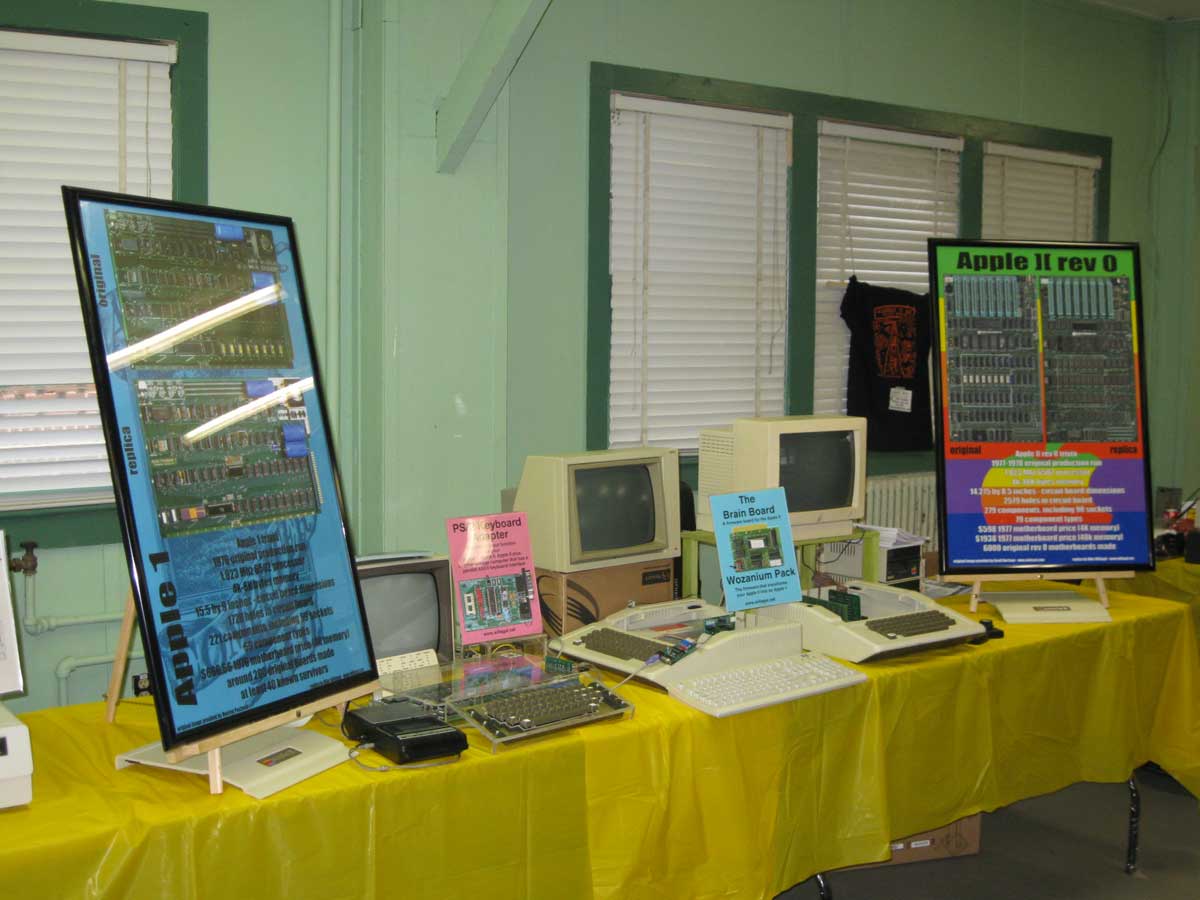
Here is my exhibit, where I showed the Mimeo, A2 rev 0, brain board and PS/2 keyboard adapter. My exhibit won the gold medal in the preservation/recreation catagory.

my VCF east 7.0 exhibit

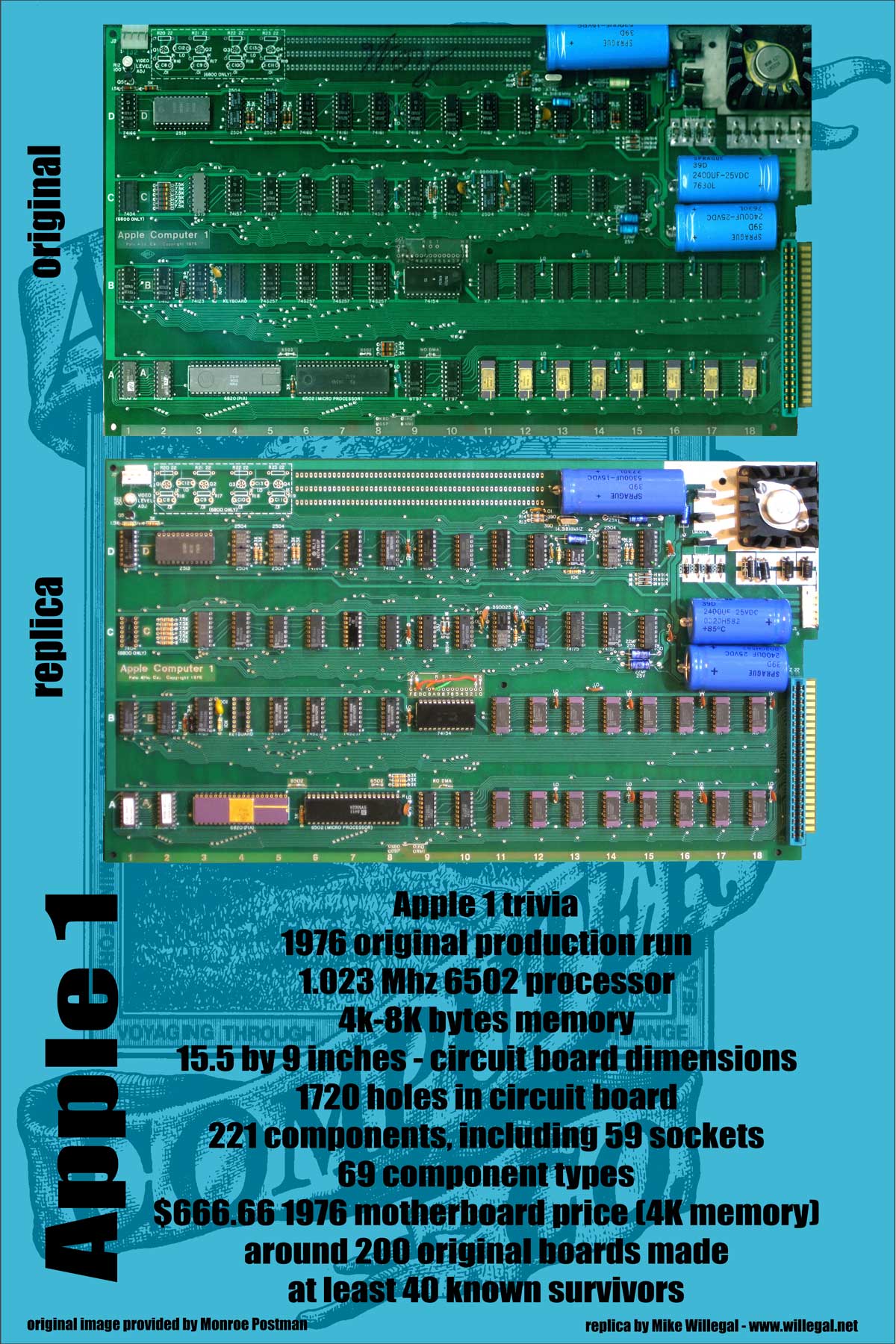
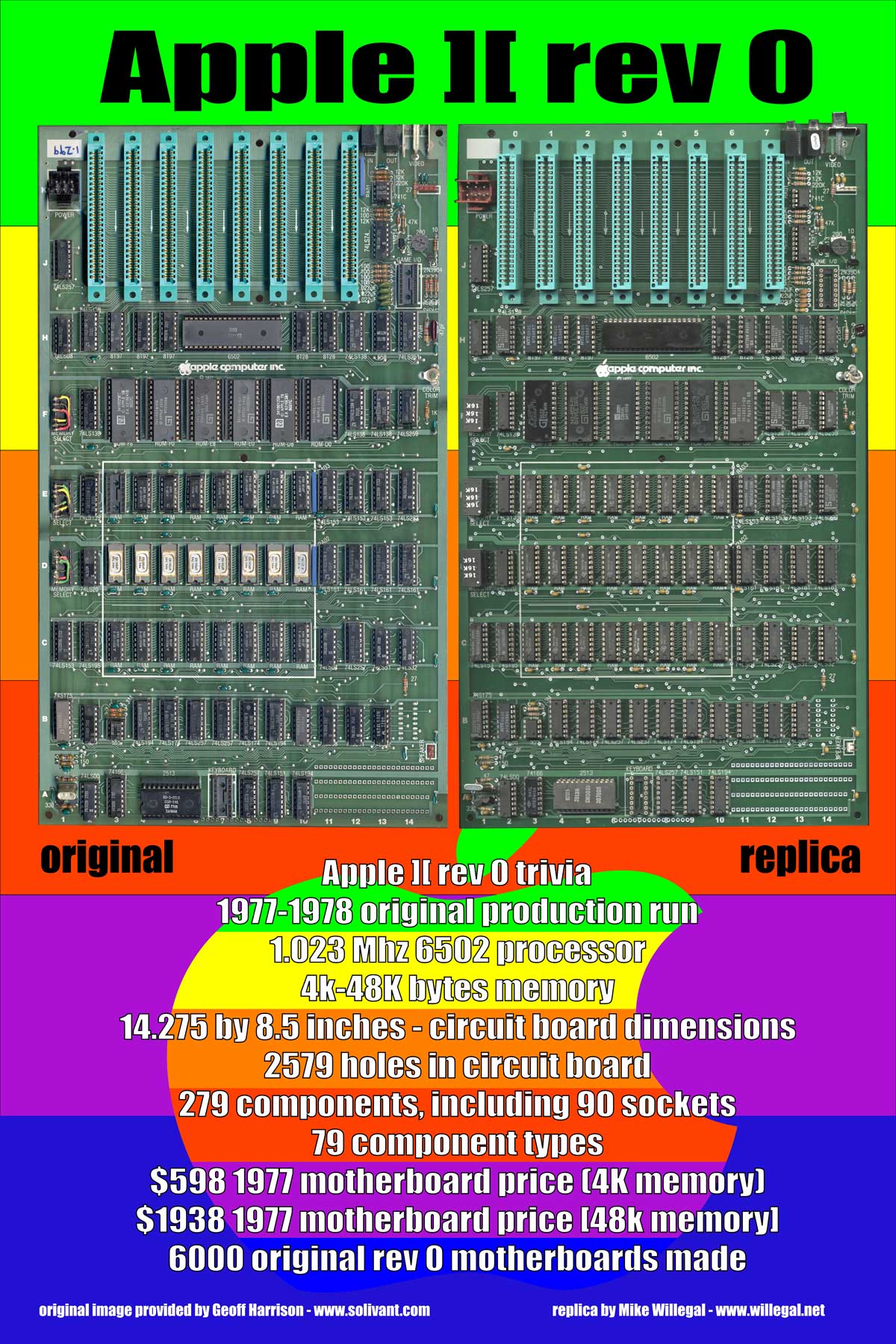
Here are the posters I displayed in my exhibit.

First the Apple 1/Mimeo poster

A1 poster

A1 poster

Second the Apple II/rev 0 poster

A2 poster

A2 poster

Note on BB assembly, Version 5.1 PROMs shipped, and Why Is the BB Upside Down?

For people that still had the FCS, 4.0 PROMs, version 5.1 PROMs were shipped on Monday and should be in your mailboxes soon. I will only be updating version 5.0 PROMs upon request. The only difference between version 5.1 PROMs and 5.0 PROMs, is in the power up screen and it doesn’t affect operation in any way.

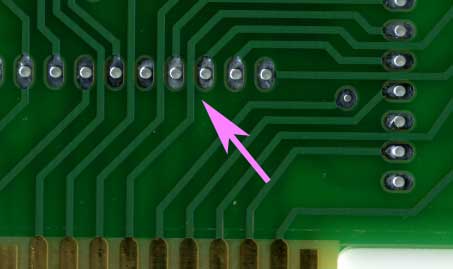
Though assembly is really straight forward, there is one thing to watch out for when assembling Brain Boards. Where the traces run between pads, the soldermask reveal extends right up to the edges of the traces and, on some boards, where registration isn’t perfect, the solder mask reveal may expose a tiny part of the trace. There is potential here for shorting the trace to the pad when soldering a component to this pad.

Brainboard-soldermask

When soldering these pads, be careful that you don’t accidentally bridge the gap between the pads and the adjacent trace. If you can’t get rid of the bridge with a solder wick or solder sucker, the easy fix is to cut the solder bridge with a hobby knife. Check continuity with an ohm meter to make sure the connection is broken.

Is the Brain Board Designed Upside Down?

It’s funny that no one has questioned or commented about the upside down layout on the brain board. This was done on purpose because of the vastly improved layout possible with upside down chips. The layout of the address and data bus connections between the 27c256 and 74LS244 sockets and the edge connector would be much more complicated if the chips were right side up. Flipping the 27c256 right side up moves the data bus connections of the 27c256 to the opposite side of the chip from the 74LS244 and Apple data bus. Also, all the lower address lines would have to be crossed to properly connect the 27C256 to the Apple bus.

Once I flipped the 27C256, I figured I had to flip all the chips and the silk screen to prevent confusion and mistakes during assembly.

Version 5.1 Brain Board Manual posted on BB page

The only difference between version 5.0 and 5.1 is the power up screen. The original A1 had alternating “_” and “@” signs with the @ signs flashing. The @ signs actually disappeared during the flash off.

With version 5.0, I had the @ signs flashing between normal and inverse instead of completely disappearing. With version 5.1, this was fixed to have the @ signs disappear during flashing, like on the original Apple 1. I actually had it right on earlier versions, but made a change to dramatically improve initialization time in version 5.0 and created this discrepancy at that time.

I’ve been shipping 5.1 since 4/1/11, and have heard no reports of issues. In fact, other than the flashing @ signs, I haven’t heard of issues with any of the versions, other than someone verifying the memory corruption bug with 4.0, that I previously reported in my blog.

Because the difference is pretty small and does not affect operation in any way, I don’t intend on automatically shipping updated 5.1 PROMS to those who already have 5.0 PROMs. If you have version 5.0 you can request an update or if you have a PROM burner, I can send you an Intel hex file with the new image.

There are still a few people with version 4.0 that I owe an update to – I plan on shipping version 5.1 to you around the end of the month.

A2 Hobby/Proto Board Evolution

This PCB layout is now in it’s fifth major revision and counting. Here is how it’s evolved.

A2 Hobbyboard Layout


1) A direct copy of Apple’s Hobbyboard. Many years ago, I used one of these cards to build an A/D interface with temperature sensor. This layout is ideal for prototyping with wire-wrap technology, but not so good for point to point wiring, which I prefer these days. So I moved on.

A2 Shutter Tester on QRC proto board

A2 Shutter Tester on QRC proto board

2) A direct copy of a Quality Resarch Company (QRC) Apple 2 computer prototype board. I used one of these a few years ago to build a prototype shutter tester. This board is ideal for point to point wiring, but I have decided it would be neat to build into the layout some basic I/O components like space for a 2K PROM and data bus transceivers.

The first proto design of my own making

The first proto design of my own making

3) This led to the first of my own designs. I incorporated space for a bus transceiver, a 27C256 EPROM, a SPDT switch and a DB 9 connector in this one. I used the 27C256 instead of a 27C16 because they are easier to find and cheaper, despite the fact that it has 16 times as much memory than is really needed. However, the handing of the I/O strobe for the 2K memory exansion space is kind of messy. On Apple’s super serial card, it takes 4 74LSXX series chips. This would require a lot of wiring and take up a big piece of the proto area. For these reasons, I decided to put this logic in a PAL or GAL and include the wiring right on the proto board, which leads to my next design.

My Second Proto Design

My Second Proto Design

4) In this version, I removed the toggle switch, thinking that it was not really that useful an idea. I was thinking I wanted the capability of interfacing an AVR micro-controller, while some other folks thought that a design that supported classic chip would be more appropriate. The 6522 VIA is a classic 6502 family part and includes some neat features including built in timers. I also switched from using a 27C256 to 28C256 flash part, so that it could be programmed in place, without the need for a PROM programmer. All along, I’ve wanted the capability of supporting that AVR on this board, but supporting both a micro-controller and a VIA seemed kind of awkward on the same layout.

Third Proto Design

Third Proto Design

5) My current layout tweaks the previous by making the half of the 6522 that is used for input/output pins a little more generic. The 6522 will still drop right in, but if something different is desired, then you just need to connect the bus interface to the proto area the way you want it. It is fortunate that the 6522 was set up with the I/O ports on one side of the chip and the bus interface on the other. In some ways, the 6522 VIA bus interface is just about an ideal generic A2 interface device. You have the system clock, the device select signal, read/write, interrupt, the data bus, and the four address lines that will address all 16 locations in the device select region of each slot. If you need some other bus signal, it can always be picked up off of the pads near the edge connector. One of my next challenges is to see if I can interface an AVR micro-controller directly to this bus, without additional components.

This design is not done evolving, but at this point, I think I’m happy with most of the major design decisions. I have plenty of FLASH memory for the program, a 6522 VIA for hardware interfacing and DB-9 for connection to the external world. With the 6522 in place, I have space for 4 16 pin chips, an 8 pin chip and plenty of discrete components. Yet the 6522 could easily be replaced by something else, like the AVR I keep thinking about.

One thing that might change is the DB-9, which takes up a lot of real estate. A KK type header like the one used on the super serial card is likely to replace it.

If you have ideas or opinions on this hobbycard design be sure to let me know. The more input I get, the better this card is likely to become.